
Top Ten Joomla Security Problems ... and how to avoid them
Joomla Security issues are always a hot issue :) Unfortunately, there are some mistakes that are repeated over and over again creating security problems that can easily be avoided. Here are the problems - the Joomla security issues and what you should do to avoid them.
10 Joomla Security Problems
10. Cheap Hosting Providers
Never go for the cheapest hosting provider you can find.
Typically cheap hosting providers use shared servers that host hundreds of other sites, some of which are low-quality spammy sites that can be easily hacked. Since they are on the same IP typically, your site will be slow, be in a "bad neighbourhood" with a low reputation, and might get compromised if other sites are hacked.
Check the list of this website's recommended and Joomla approved hosting provider for CollectiveRay here.
9. No Backups
Make sure you have regular Joomla backups. In case your site gets hacked or something happens, you will be able to rebuild from scratch. We would recommend going for a combination of hosting based backups such as those offered by InMotion (the host we use and trust - link in previous paragraph) and then using a 3rd party extension such as AkeebaBackup.
8. Skipping hardening (tweaking settings for security) of PHP and secure Joomla! settings
Forgetting or skipping the adjusting of PHP and Joomla! settings for increased security is a huge no-no.
There are many small settings and tweaks you can do to make your PHP server and Joomla! more secure and prevent most of the Joomla security issues from occurring in the first place and avoiding all types of security problems.
We have a list of the things you should do to "harden" your installation further down in this article.
7. Using Weak Passwords or reusing passwords
Using the same username and password for your online bank account, Joomla! administrator account, Amazon account, Yahoo account, Gmail account and everywhere else is another mistake you should avoid like the plague.
Always use strong passwords that are different from those for your other accounts.
Remember also to always change the name of the admin account to something other than "admin". Also, it is highly advisable to install a plugin such as Adminexile that protects your administrator backend from hacking attempts.
6. Install and forget
After installing your brand new beautiful Joomla!-powered site, check it regularly making sure nothing has gone wrong.
Lots of things can go wrong and you can get all sorts of Joomla problems if you don't maintain all the components of your Joomla installations.
Let's help you manage your Joomla better


5. Having no development server
All upgrades and extension installations should be first tried on a development server, before being done on the live site.
If something goes wrong on the development server, you can avoid creating the same problem on the server, and you'll make sure your live site stays clean. You could use simple servers that can be installed locally such as XAMPP or MAMP.
4. Trusting all 3rd party extensions
If you want to optimal Joomla security you should only install the barest minimum extensions you require.
If you can avoid installing a 3rd party module, avoid it. Not all 3rd party extensions are free from trouble, and some are just plain horrible, buggy and contain vulnerabilities.
Each 3rd party extension is another component that might expose you to vulnerabilities and must be kept up to date. Be wary of the 3rd party extensions you install, preferably go for the professional components from reputable companies.
We typically only install extensions from the bigger vendors such as RegularLabs, Tassos Marinos, Akeeba etc.
3. Forgetting to keep your Joomla! site updated
After installing your brand new beautiful Joomla!-powered site, keep yourself up to date with any stable releases and update with each stable release.
Most stable releases fix problems and vulnerabilities.
Forgetting to upgrade will leave your site exposed to all sorts of Joomla problems. This also applies to any 3rd party Joomla extensions you install.
 2. Lack of information when asking for help
If your site gets hacked/cracked, go to the Joomla forums, and before you start posting away like crazy, make sure you have all relevant information available, such as the version of Joomla you have installed, what version of 3rd party extensions you have installed.
This information will help to identify what could have caused your hack, and how to fix and avoid it happening again.
1. Fix any cracked file and forget it
Once your site's been cracked, fixing the defaced file is not enough.
Check your site's logs, change your old passwords, remove the entire directory and rebuild it from clean backups, and take all precautionary actions!
Serious Joomla security issues can recur if you do not restore from a clean backup because backdoors can be present in your installation, which will be reactivated by hackers once you remove what you think is the only infected file.
This is a revisited version of the Top Ten Stupidest Administrator Tricks, without the sarcasm and with recommendations of how to fix the top ten Joomla Security issues instead :)
All the Things to Do to Secure Your Joomla Website
Although by default the Joomla! core development team takes great measures to ensure that there are few or no vulnerabilities in the code, there are a number settings which if not given due attention may leave your website vulnerable to attacks.
This article will give a list of measures to take to ensure a more secure Joomla! installation. These are all tips that we use on our own web design blog, CollectiveRay, so we know that these work nicely!
1. Rename the Joomla! admin account
This simple step hardens your website significantly. again if you are paranoid, you should use random characters both for the username and the password for the admin
2. Make sure your configuration.php file is not writeable!
This step is critical, and a world-writeable configuration.php file is an invitation for hacking.
You can make this non-writable from within Joomla. This is something that new versions of Joomla do automatically, but you can confirm whether there are any issues with file permissions by visiting System > System Information > Folder Permissions. The configuration.php should be marked as Unwriteable.
3. Always try to keep your Joomla installation upgraded to the latest version
Each Joomla update or new versions typically adds security by closing any security holes and exploits, or other discovered vulnerabilities. If you skip any update, you're leaving that "hole" open in your site's security and are risking getting hacked.
Any security-focused update should NEVER be skipped. Each update will be named as "Maintenance", and fixes bugs or small issues and "Security" which typically addresses security vulnerabilities. Security updates should be installed immediately because it means that the vulnerability is now known to hackers and they will immediately start exploiting it.
4. Upgrade to the latest PHP version
If your host allows it, switch to the latest secure versions of PHP.
Each subsequent release of PHP introduces additional security (besides improving performance). Unfortunately, older versions of PHP are typically not updated, even if security problems are found.
This means that any security issues discovered will NOT have a solution and your site will be exposed to such exploits.
5. Ensure correct File and Folder permissions
Once you have a stable site, you should change all file permissions to write-protected using CHMOD (644 for files, 755 for directories).
Any good FTP software should allow you to do this without having to use any scripts, or you could do this via CPanel or File Explorer.
You can also use the Global Configuration to apply the default permissions to all files and folders.
Older versions of Joomla use to allow the changing directly from the Administrator as per the instructions below, but the newer versions of Joomla do this automatically. However, make sure you don't change them yourself to fix some other problem.
Go to Site > Global Configuration > Server tab. Scroll down until you find File Creation. Click on CHMOD new files to 0644, and CHMOD new directories to 0755, and click on the Apply to existing files checkbox to run this setting on all your current files. Once this is done, make sure that the configuration.php file is still unwriteable. If it is Writeable, click on the Make Unwriteable after saving to make it not writeable
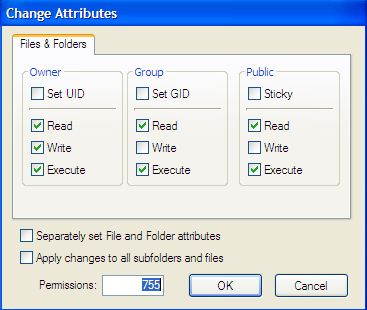
You can use an extension such as eXtplorer which has an easy way to edit permissions. It allows you to do this recursively, thus avoiding having to go through each and every directory. You can also use components such as Admin Tools for Joomla! by Akeeba which can check and fix such problems automatically.
Admin Tools also performs a number of other performance and security fixes. Do check it out here.
6. Check your site for vulnerabilities
There are a number of tools which test your Joomla for corrupt files, and vulnerable files. These are typically penetration testers that test for common problems.
You can also use the Joomla Vulnerable Extensions list. This is a live list of any extensions that have a vulnerability. Every so often (every month or so), you should check the latest list to ensure that none of your current Joomla extensions are on the list.
If any of your extensions are on this list, make sure you update it to the latest (patched) secure version.
7. Never leave extra files running around
Ensure that there are no unnecessary files on your web server.
Delete any files leftover from the installation. Delete your installation folder and any compressed files which you might have uploaded to your webserver to install the Joomla! core. Remove any components / modules / templates that you are not using.
Always keep your site as lean as possible. Any extra files could become a liability.
8. Protect your configuration files and sensitive directories
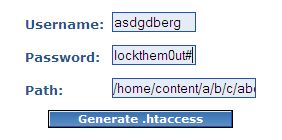
- All configuration files should not be put in the public HTML directory. Some web hosts (e.g. GoDaddy - check out how to access GoDaddy email login) might not allow you to do this, so the next best thing is to create a password-protected directory by using an .htaccess file. If you're not sure about the function of the htaccess file, its a good idea to read about it before you continue. Create a directory, it's a good idea to name it something random e.g. ehxum3jq rather than config in your Joomla! directory.
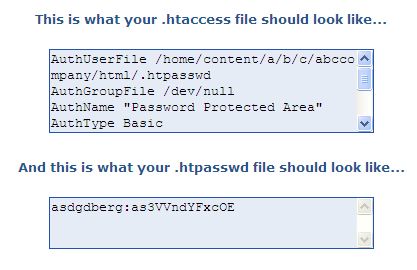
- Create an .htaccess file to protect the directory. Use an .htaccess generator to help you generate the file. Based on the example above you should have an .htaccess file similar to this. Remember that the directory you want to protect is the home directory (if you are not sure you can find it in the Absolute Path of your original configuration.php file) and appending the directory name you will be putting your protected files in e.g. /home/content/a/b/c/abccompany/html/ehxum3jq/
- N.B.: This only gives Basic Authentication which does not offer rigorous security. In the words from Apache.org:
Basic authentication should not be considered secure for any particularly rigorous definition of secure.
Although the password is stored on the server in an encrypted format, it is passed from the client to the server in plain text across the network. Anyone listening with any variety of packet sniffer will be able to read the username and password in the clear as it goes across.
To really offer security, you need to send the password through SSL (where it would be encrypted along the way).
- Use strong passwords or passphrases or random characters for the .htpasswd file which should be something like this. You can protect your directory even further by using IPs in the .htaccess file as stated in this FAQ
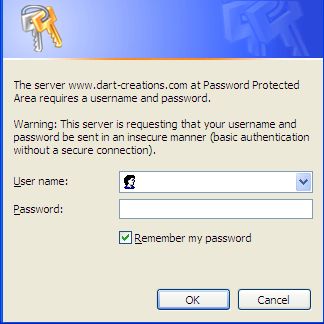
- Test to ensure that the directory is protected. Put a file in it and try to access e.g. https://www.yourcompany.com/ehxum3jq/myfile.txt. You should be prompted for a password. Supplying the username and password specified during generation should grant you access to the file, otherwise, you should get a 401 error (Access Denied).
- Use the following Joomla Forum FAQ to help you move config files from the public HTML to the password-protected directory you have created. Be extra careful though when you update the Global Configuration file, because this will overwrite the file that you have created. Write-protect the configuration.php file, and any changes you require do them manually using an FTP client. And add the following line so that anyone who tries to access the php file gets a "Restricted access" error. As a general rule, all PHP files on your website should contain this line. Any PHP file which does not contain this line is a security risk.
defined('_JEXEC') or die;
defined( '_VALID_MOS' ) or die( 'Restricted access' ); //for older versions of Joomla
9. Keep 3rd Party extensions updated
3rd Party Extensions are one of the best things about Joomla!
There is such a wide variety of extensions, that you can probably find something already written for you. However, 3d party extensions come in all shapes and sizes and are not monitored by the core team.
This means that vulnerability exists which can compromise your installation. You need to be extremely careful about installing any extensions. Monitor the List of Vulnerable 3rd Party / Non-Joomla Extensions. If you install extensions make sure you monitor their releases and ensure that you follow their security recommendations.
For more information go to the Joomla! Security FAQ.
10. Backup! Backup! Backup!
Even if you have taken ALL steps to ensure that your website is 100% secure, vulnerabilities might still lurk, waiting to be found and exploited. If your site does get hacked, you MUST ensure that it comes back online as soon as possible with as little loss of content as possible. For this, you must ensure that you have good working (daily or more frequently as the need arises) backups.
AkeebaBackup is an open-source component for the Joomla! CMS that allows for full site backups (files and database). It allows you to create full backups and has full functionality to restore your site if things go belly up.
Any other Joomla security tips?
That's for now. If you have any further Joomla security suggestions, we'd love to hear them in the comments below.



Please leave a useful comment with your thoughts, then share this on your Facebook group(s) who would find this useful and let's reap the benefits together. Thank you for sharing and being nice!
Disclosure: This page may contain links to external sites for products which we love and wholeheartedly recommend. If you buy products we suggest, we may earn a referral fee. Such fees do not influence our recommendations and we do not accept payments for positive reviews.





 and many more ...