
Did you know it is possible to put a module in an article in Joomla i.e. directly in your content using the Joomla loadmodule / loadposition function?
For example, let's say we want to put our Joomla Paypal module (or any other module for that matter) in an article rather than in a module position.
We can do this using the LoadModule or LoadPosition default Joomla plugin.
There are of course many other reasons to place a module in an article. Another very good example of putting a module in an article is when we add a CTA (Call-to-action) for somebody to join our mailing list.
We can use a subscribe module, but by using the loadposition function, we can place it anywhere at will within the content of a Joomla article.
Create the Joomla Module or Position to Load
First of all, make sure you have created and defined the module which you want to show in the article.
This is fairly simple to do:
- In the top menu go to Extensions and click Modules
- Use the filter feature to search for and find the module you want to put in an article and click on the module. You can also create a new one, or create a copy of one that exists.
- Create a new position name by typing a new name (one that won't conflict with any positions used by your template). For example, let's type in_article_subscribe
- Under the Module Assignment, select the pages you want to assign the module to and Save. We typically apply it All Pages so that we can use it anywhere we want to across the site.
Now, once you have created the module you want to display in the article, there is a default plugin that now can load the module or module position in the article.
You can call any module position in a content item with the following code
Use Joomla loadposition to put a module in an article
To load a specific position (from the module positions that you have defined), you can use the syntax below:
{ loadposition in_article_subscribe}
This would load the position in_article_subscribe.
NB: (REMOVE the leading and trailing spaces before the {})
Remember, you also have to enable the "Content - Load Modules" plugin from the Plugin Manager (if you have disabled it for any reason).
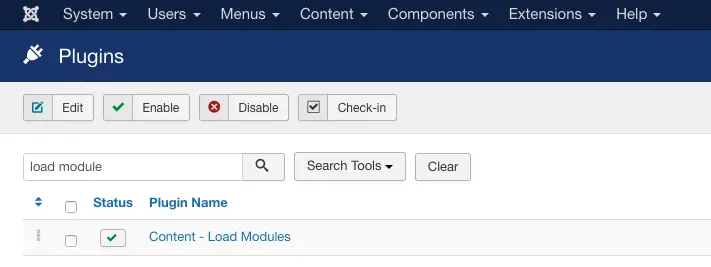
Another good example which we like to use is to load the Login module for those users who have not logged in yet, or show them a message that they should register and log in.
This is an excellent opportunity to use the Joomla load module function to insert a Joomla module in an article.
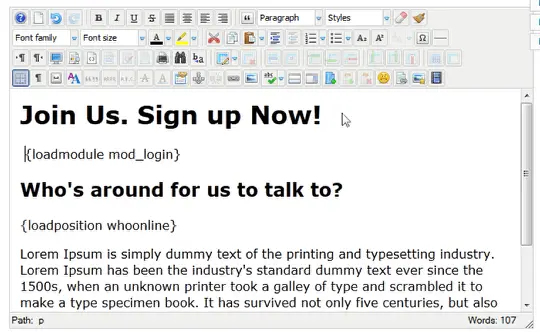
NB: Remove ALL spaces between { loadposition and the trailing}. There should be NO leading or trailing spaces.
We could not do this above because otherwise, Joomla (our CMS) would have removed the text and tried to replace it ;-) Also make sure it's all in lowercase. To make it simpler it should like this [loadposition user4] but use curly brackets { } instead of square brackets [ ].
Another good example of the usage of this module is this.
Let's say you want to create an advert (or affiliate link), but instead of copying and pasting the code, you want to be able to replicate this advert at will in your content items.
Therefore you use the mod_html module to create the advert you need.
Now, each time you want to display this advert, you just insert the { loadposition xxxx } (be sure to remove extra spaces before loadpostion and after xxxx, spaces were added intentionally in this example) in the content.
The good thing about this is that if you want to change the advert, you only need to change this in the module rather than in every content item. Below we are using the functionality to show our ebook subscribe box!
Let's help you manage your Joomla better


Joomla loadmodule
The similar Joomla loadmodule feature works in exact the same way as we described above, but in this can, you load a specific module, rather than a module position.
{ loadmodule login }
This would load the login module.
NB: (REMOVE the leading and trailing spaces before the {})
The same logic applies here, you can load any Joomla module you like, wherever you need by specifying the name of the module to load.
Wrapping Up
Once you are familiar with the concept of loading a module or module position in an article, you'll start finding plenty of ways of using these in your article to create particular functions. For example as you can see above we are using the loadposition module to load a Joomla ebook call to action using the syntax of these functions.
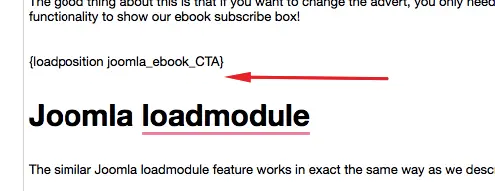
As you can see it gets replaced by our eBook banner.
Got any questions? Let us know in the comments below!



Please leave a useful comment with your thoughts, then share this on your Facebook group(s) who would find this useful and let's reap the benefits together. Thank you for sharing and being nice!
Disclosure: This page may contain links to external sites for products which we love and wholeheartedly recommend. If you buy products we suggest, we may earn a referral fee. Such fees do not influence our recommendations and we do not accept payments for positive reviews.





 and many more ...