
Another easy to do but often asked question about Joomla is how to change the default Joomla homepage from the frontpage component to another page.
How to Change the Default Joomla homepage
One of the things we like doing when we design websites at CollectiveRay, is to customize the homepage items.
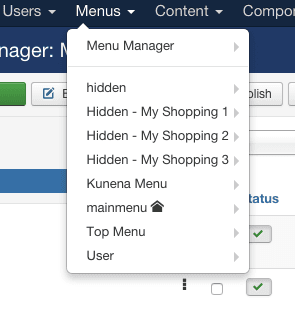
In Joomla 2.5 and Joomla 3, this has become quite easy to do ... when you click on Menus, you will see one of the menus has a star icon.
Either click on that menu and in the "Home" column click on the star icon and this will become your new Joomla front page or Joomla home page.
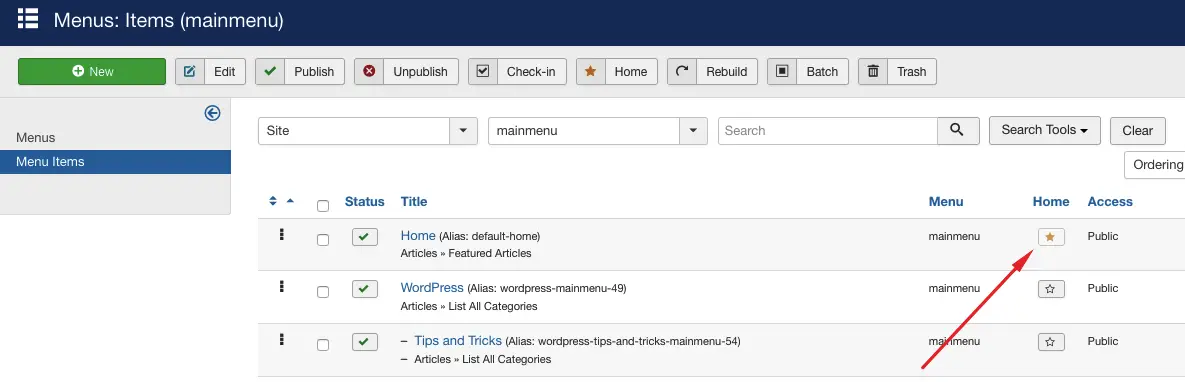
If you want a different menu item in a different menu to become your home page, simply navigate to that menu and click on the Home star icon button on the menu item you want.
The menu which features the home link can also be identified by seeing the home icon in the list of menus.
Need help getting stuff done? Try these top-rated affordable gigs on Fiverr!

Click here to find experts on Joomla.
Let's help you manage your Joomla better


How to Customise the Joomla Homepage
The Joomla frontpage (or the Featured Articles Component) is used to customize what the home page looks like in Joomla.
This simple question is asked over and over again on the Joomla forums by people who are new to the CMS. The most popular question would be, how do I change from two columns to one column display.
There are of course many others, but in essence, there are a lot of questions going on about how to customize the front page or landing page of your Joomla website.
The first thing you need to understand is that the Joomla homepage is powered by what is called the "Featured Articles" component.
Essentially, this is a core Joomla component that allows you to feature specific articles in a specific format. Of course - it is completely up to you, the designer or webmaster of the Joomla website which articles you want to show.
Understanding the Frontpage component (or Featured Articles Component)
The Joomla frontpage is a component that allows you to control what your homepage looks like.
It is slightly different from standard components in the fact that its configuration is not done via the Components menu. Instead, you need to find the Home link in your main menu.
In a default installation, the Home points to the frontpage component.
Joomla Featured Articles
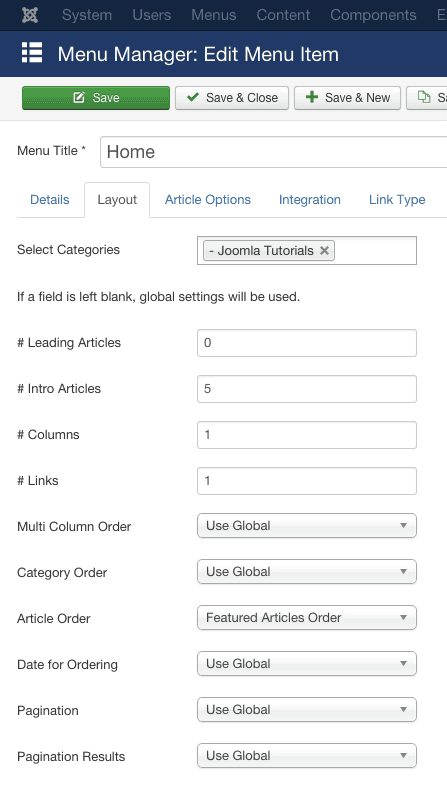
As you can see the Home at CollectiveRay (or the frontpage) right now is customised through the Layout tab.
Using the Layout tab, we can specifically organize what the Joomla frontpage is going to look like. We can decide how many Leading Articles we are going to show (i.e. fully featured articles), how many articles we are just going to show the introduction to - Intro Articles, how many Links to other articles we're going to show and how many Columns we're going to have.
# Leading Articles
This parameter determines the number of full-width articles to display.
Articles displayed in the Leading will have the Intro text displayed. This setting overrides the columns parameter i.e. if you have decided to have 2 columns and 1 item in the leading intro you will have a layout as follows:
Article 1 - Full Width (Row 1 - Leading)
Article 2 (Row 2, Column 1) Article 3 (Row2, Column 2)
Article 4 (Row 3, Colum 1) Article 5 (Row 3, Column 2)
# Intro Articles
The number of articles whose Intro text will be displayed. This excludes the number of items in the Leading articles parameter.
# Columns
The £columns determines how many columns will feature in each row. If you want more than a single column, set the number of columns here.
# Links
The number of links to articles to display. Once again this number excludes the number of items in the Leading and Intro parameters. Items that show in the Links section will feature just the title of the article (with no Intro text displayed).
How to Show an Article in the Featured Articles
Setting the above parameters will determine how the items look, but we also want to configure what items we want to feature in this part.
There are two important things you need to consider to determine what articles will show.
The first is the "Select Categories".
Select Categories
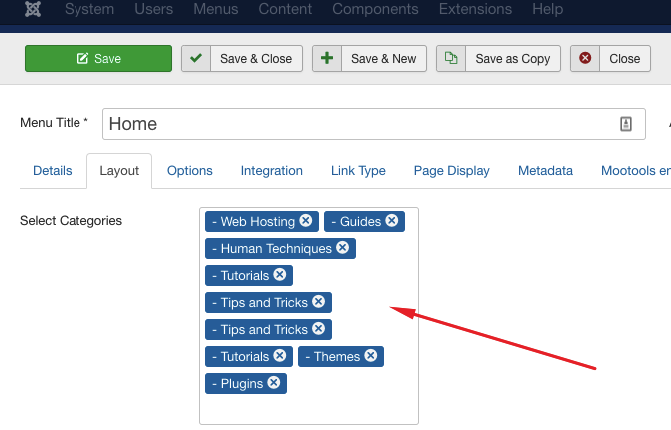
As you can see in the screenshot below, the Select Categories is used to choose which categories to show content from. So if you want to feature content from a specific category only, you can select that category.
Choose as many categories as you need. Categories that are not selected will not show any content on the front page.
Setting an Article as Featured
For an article to be shown in the Featured Articles, or on the Joomla homepage, we also need to mark that specific article as Featured.
There are three ways of doing this:
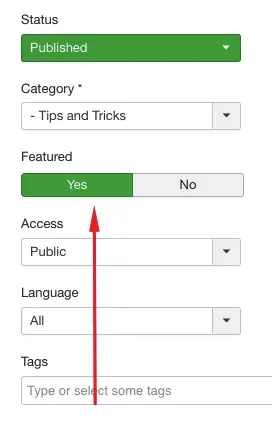
The first way is using the Featured toggle on the right-hand side of an article.
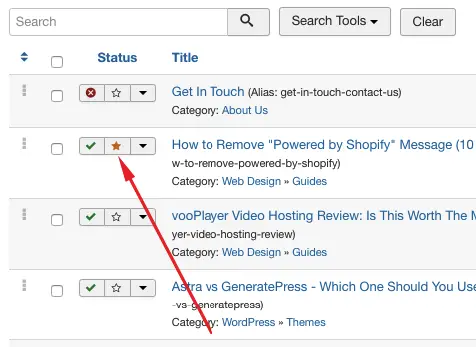
The second is by clicking on the Featured article icon (star), in the list of articles. If you click on the ⭐ that article will become a Featured Article.
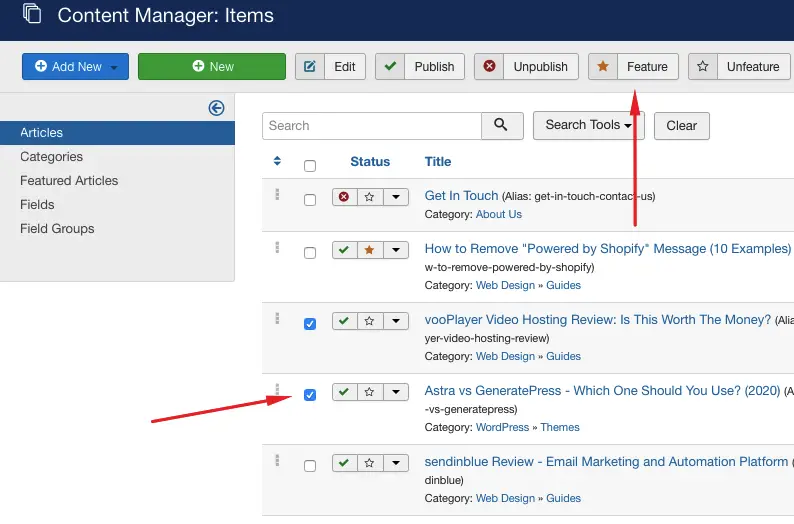
The third way is by clicking on the checkbox to select an article or multiple articles, and then clicking on the Featured button, at the top of the Content listings:
Displaying Joomla Modules on the Home Page
So far we've seen how to feature full articles, content introductions and links to content.
But what if we want to add specific features or modules to the home page. In particular, we may want to show certain modules on the home page only.
This can be done through the parameters of each individual module.
Go to Extensions > Modules
Click on a module that you want to show on the front page only.
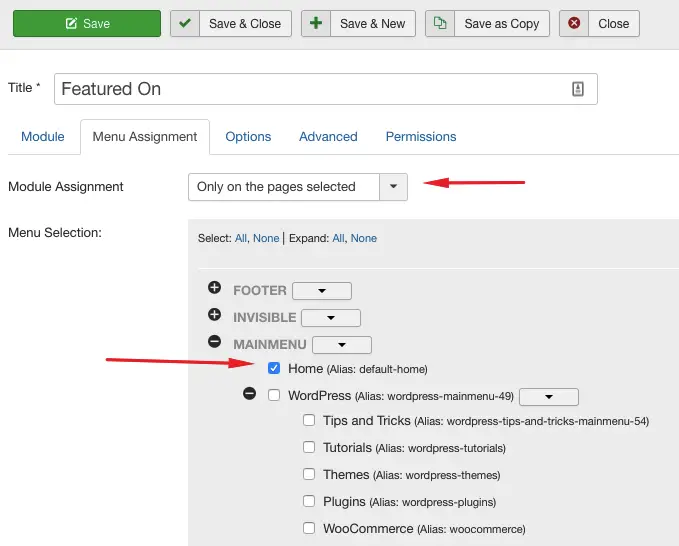
Click on the Module Assignment tab, and select Only on the pages selected in the drop down. Click on Expand All or None to expand the menu items, until you get to the main menu that features the home page.
Click on that menu icon to select it.
This means, that the module will show "Only on the pages selected" and we have selected "Home", so the module will only show on the frontpage.
By performing the following procedure several times for the different modules, each time assigning them to different positions, you can fully customise what the Joomla home page looks like.
Wrapping Up
Understanding how the Joomla home page works is not easy, and is a source of frustration for many people who are not familiar with the way the framework works. However, once you understand the above concepts, you will have a lot of power to customize the front page to your needs.
Not only that, but it is very easy to change the content visible just by toggling a few switches here and there.
If you have any questions, do let us know and we can expand in the comments below.



Please leave a useful comment with your thoughts, then share this on your Facebook group(s) who would find this useful and let's reap the benefits together. Thank you for sharing and being nice!
Disclosure: This page may contain links to external sites for products which we love and wholeheartedly recommend. If you buy products we suggest, we may earn a referral fee. Such fees do not influence our recommendations and we do not accept payments for positive reviews.





 and many more ...