
This is a default UX you should enable: Linking your Logo to the Joomla Homepage
One of the most common navigation standards is that when you click on the logo of your site you are taken to the Homepage of a website. Funnily enough, there are lots of Joomla templates that do not have this functionality implemented automatically.
At CollectiveRay, we will show you how to enable this by doing the following steps:
Using FTP software or otherwise, go to the index.php file of you template in joomla/<template>/index.php
Look for something like
<div id="logo"></div> (this is what displays the logo in Joomla), and change this to
<a href="/index.php"><div id="logo"></div></a>
This simply creates a link to the default Joomla homepage from your logo!
[How to] Change logo in Joomla Admin / Backend
Sometimes it may be desirable to replace the Joomla logo with your own customised logo in the administration panel. This can be easily done by manually changing some images in the administration template.
Joomla 3
Using the template manager, using FTP or using the CPanel file manager, go to the ISIS template files, find the images folder and replace the files with a version of your own.
The location of the files should be:
public_html/administrator/templates/isis/images
In there you'll find the following logo filenames:
- logo.png
- logo-inverse.png
- login-joomla.png
- login-joomla.png
- joomla.png
Don't change the filenames of the logos, so that you won't need to change any code, just rename your new logo to logo.png and the other names of the files and replace them.
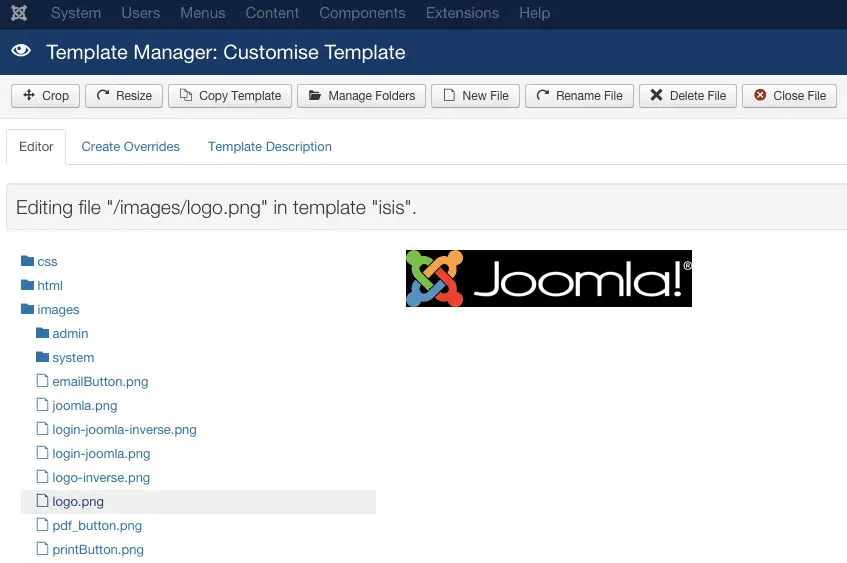
Ideally, you keep the same sizes of each image so that you that everything stays in good proportion.
Joomla 2.5
Using FTP go to the following directory administrator\templates\bluestork and open index.php. Find the following line and remove it completely or change it to suit your needs:
<span class="logo"><a href="https://www.joomla.org" target="_blank"><img src="/templates/<?php echo $this->template ?>/images/logo.png" alt="Joomla!" /></a></span>
Using FTP software or some other way to change Joomla files go to the following directory: \administrator\templates\khepri\images, you will see 3 folders called h_cherry, h_green, h_teal.
You will find all the header images in these files, select the colour you are using and you can replace the images with the new logo images of your choice,
Please keep the images the same dimensions or you will have to change several bits of code through the site and CSS. Ideally, if you want to change the logo only, keep it the same size, since the template has been designed for that size, and it usually looks best at that size...
Changing the logo in the Joomla default template
One of the very first things we all do in a new Joomla installation is to change the default Joomla logo.
When you are still a Joomla beginner, this might be a bit of frustrating task, especially when you still have no idea what templates are, and how to go about changing them. Well, this tip tries to make things easier :)
Joomla 3
To edit the Joomla 3 logo, you'll need to find the Logo option in the Template Options. Go to Extensions > Templates > Make sure "Styles" are selected > Protostar > Advanced.
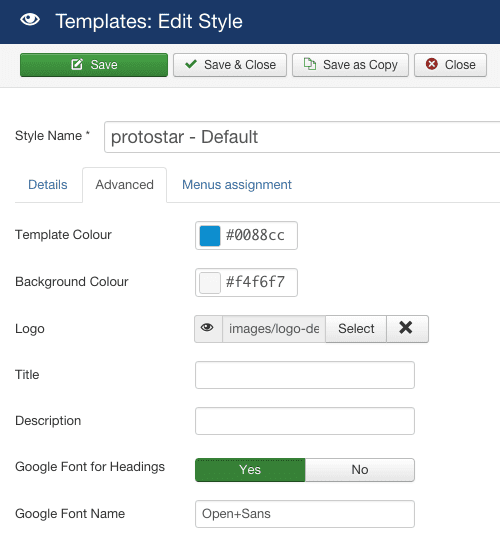
There you'll find a Logo option. Click on the "Select" button, and choose your logo image file to display, or upload a new image to use as your logo.
Wrapping
This simple Joomla logo tweaks and tricks are fairly small, but they do go a long way.
If you have any other questions about the Joomla logo, or linking it to the Joomla homepage, don't hesitate to get in touch with us using the comments below.



Please leave a useful comment with your thoughts, then share this on your Facebook group(s) who would find this useful and let's reap the benefits together. Thank you for sharing and being nice!
Disclosure: This page may contain links to external sites for products which we love and wholeheartedly recommend. If you buy products we suggest, we may earn a referral fee. Such fees do not influence our recommendations and we do not accept payments for positive reviews.





 and many more ...