
New users of Joomla tend to find template module positions confusing and possibly frustrating. Joomla 3 has improved the way templates work to ensure this is less confusing, however, some users might still find it hard to add template positions to their templates. This article on CollectiveRay.com will attempt to clear the air about template module positions.
First, most people struggle to understand what template positions are available for use on their Joomla template. This is very easy to discover using the following steps:
How to Display Modules in Joomla?
When you are creating a website using a new Joomla template that you haven't used before, you need to know the Joomla template positions that are supported and you can use. You can do this either by checking out the Module Manager in the administrator, i.e. viewing the positions which have modules assigned to them, or else use this tip. To see what the modules positions available using the Module manager, you need to go to Extensions > Modules and click on an existing module.
In the position parameter, you will see a whole list of Positions that you can assign the module to. The ones available in the template will be listed in Positions dropdown:
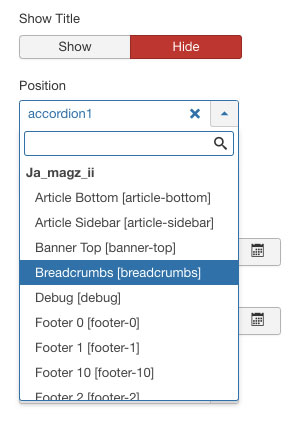
However, even if you see the list of positions, you still don't know where and how they are used in the template, so we need to see where they are positioned.
To understand how to show module positions in Joomla follow these steps:
- Go to the Template Manager (Extensions > Templates > Templates)
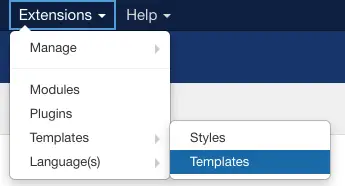
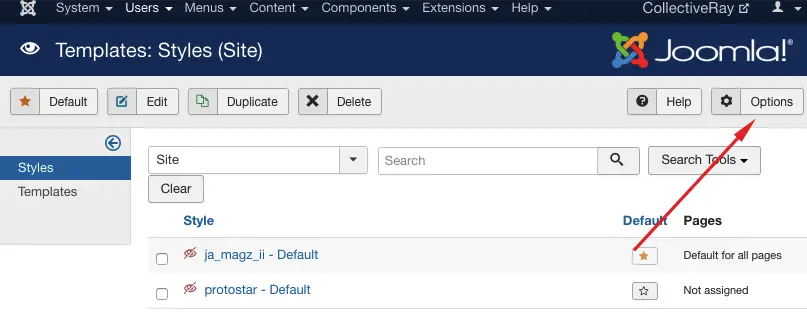
- Click on the Options button at the top right
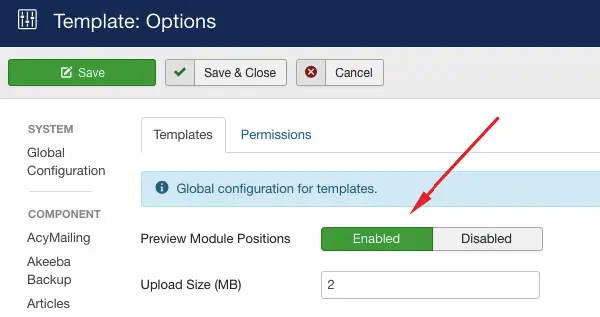
- Enable the Preview Module Positions
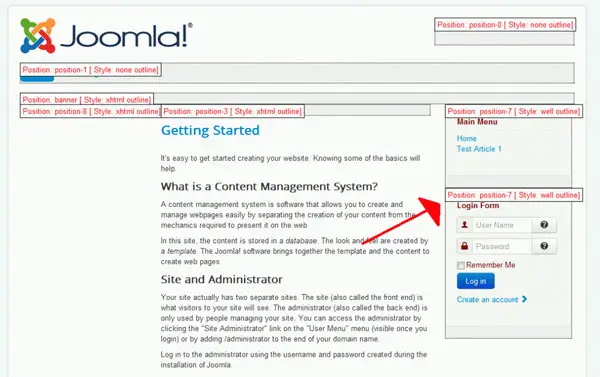
- Go to the frontend and add ?tp=1 to the end of your Joomla URL e.g. www.collectiveray.com?tp=1
- All the existing template positions will now be shown with their name e.g. position-1, position-7, banner, as can be seen below:
What are Joomla Module Positions?
Joomla positions are placeholders that you set modules to, such that a module is shown in that position. For example, if the Joomla template has a search position, you would place the search module in that position.
The same goes for other module positions such as banner, sidebar, footer, breadcrumbs, left, right etc.
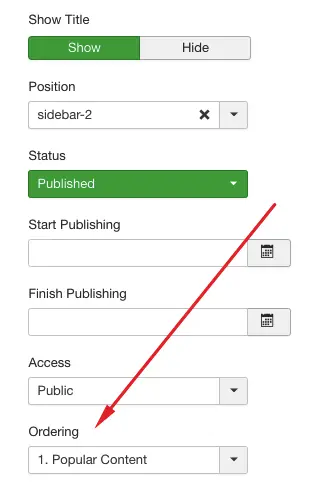
Note that you can usually add more than one module to the same position i.e. you can add more than one module to your left and right positions, with the order in which they are displayed being determined by the Order parameter in the Module setup.
The positions in Joomla 3 are defined per template. The template positions problems are the responsibility of the template developer. They need to ensure that template positions defined in the template details file, actually exist in the template.
If you need additional template positions, you would need to change your template to cater for the additional positions you need. This requires knowledge of PHP, HTML, and XML in order not to break your template.
This is particularly important for you to know and understand, especially if you're planning to use a number of Joomla extensions such as the ones which we listed here.
How to assign a Module to a Position?
When you are designing your website with Joomla, you'll want assign a number of different modules to different positions. This can be done through the Positions parameter of the module. Now that you know the positions available, you simply change the Positions parameter to the name of the position where you want the module to show.
If you assign more than one module to the same position, for example in the sidebar position, the modules will be shown in the order that they are set using the Ordering dropdown.
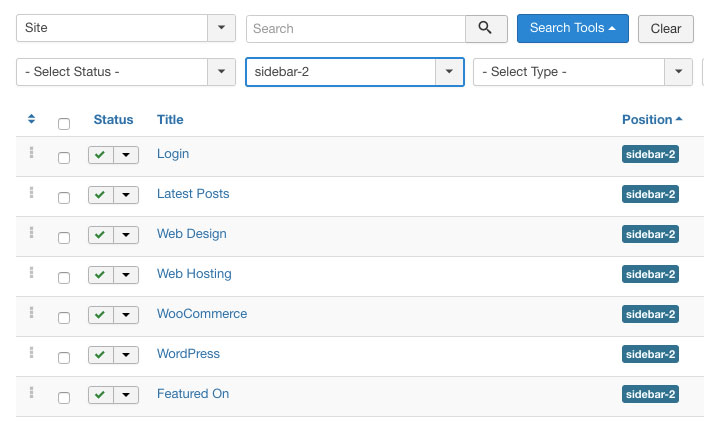
To change the order, you need to select a different position in the Ordering parameter of each module:
Using the JDOC tag
So what determines where modules are rendered?
The JDOC tag in the index.php file is replaced by the modules assigned to that position (via Extensions > Module Manager and assigning a module to a particular position) when the page is being rendered. So if we have
<jdoc:include type="modules" name="left" style="xhtml"/>
in the index.php file, and the Main Menu module is assigned to the left position, the Main Menu will be displayed instead of this tag in the left position.
This applies to each jdoc tag defined in the index.php file. If I have a
<jdoc:include type="modules" name="right" style="xhtml"/>
this will be replaced by the modules which are assigned to the right position.
Logical Position Names
The name attribute in the jdoc tag, is a logical name. So if the position name is "right", you would expect the module position to be to the right of the content, "top" to be at the top of the content, "sidebar" to be to the side and "footer" to the at the footer part of the website.
It is entirely possible to define the bottom position in the top part of the module, though typically template designers define tag names which make sense, i.e. the left position would eventually be displayed in the left area of the page, and the banner position would be displayed just above the content and so on.
How do I know what Positions my Template supports?
Most reputable template designers explain which module positions are available in the template.
In Joomla 3, the responsibility remains with the designer to define the correct positions in the template details file. However, for free templates, one might not know which positions actually exist.
So how do you go about discovering which positions are supported by the template?
The easiest way to do this is to follow our instructions above in How to Display Modules in Joomla
You can also view directly which are the positions in the template files directly!
Simply open the template's index.php file, and search for the jdoc tag. Note the name of the places when the jdoc tag appears. I.e. if you find the following tags in the index.php file:
<jdoc:include type="modules" name="top" style="xhtml" />
...
<jdoc:include type="modules" name="left" style="xhtml" />
...
<jdoc:include type="modules" name="banner" style="xhtml" />
....
<jdoc:include type="modules" name="right" style="xhtml" />
You can safely assume that the positions supported by your template are:
- top
- left
- banner
- right
Adding Joomla Module Positions
In this section we will show briefly how to create an new module position in any template.
You first need to decide where you are going to place the position in your template (in terms of the template's HTML).
You need to understand exactly how the tempalate works. For example we will be adding an leading-sidebar position to our template. We find the position (in the index.php) file where we want to add the leading sidebar and insert php / html code similar to the following:
<!-- BEGIN: leading-sidebar -->
<div id="leading-sidebar">
<div class="adlinks-class">
<jdoc:include type="modules" name="leading-sidebar" style="xhtml" />
</div>
</div>
<!-- END: leading-sidebar -->
We then need to create the Module Position in the Template Details file by creating a new leading-sidebar position. Find the TemplateDetails.xml file enclosed with you template under /templates/<templatename>/templateDetails.xml
Find the <positions> tag in your XML file. It looks something like this:
<positions>
<position>left</position>
<position>right</position>
<position>top</position>
<position>banner</position>
<position>header</position>
<position>footer</position>
<position>pathway</position>
<position>user1</position>
<position>user2</position>
<position>user3</position>
<position>user4</position>
<position>user5</position>
<position>inset</position>
<position>debug</position>
<position>search</position>
<position>debug</position>
</positions>
To add your own position, you need to insert a new <position> tag before the closing positions tag, in our case we will add the leading-sidebar position right after the debug position. The end result will be as follows:
<positions>
<position>left</position>
<position>right</position>
<position>top</position>
<position>banner</position>
<position>header</position>
<position>footer</position>
<position>pathway</position>
<position>user1</position>
<position>user2</position>
<position>user3</position>
<position>user4</position>
<position>user5</position>
<position>inset</position>
<position>debug</position>
<position>search</position>
<position>debug</position>
<position>leading-sidebar</position>
</positions>
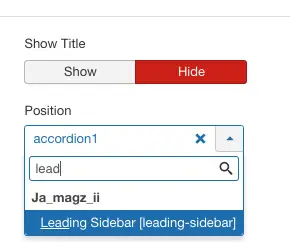
Once this is done, we can now assign a module to the leading-sidebar position in the Extensions > Modules page.
If you really want to look professional, stop searching for free templates. Most of them look poor, are very limited in positions and flexibility, have bugs, and typically contain hidden links to the original designers.
If you want your site to look great, go to the pros and get yourself a template from there. You won't be sorry, and the end result will definitely show. The first impression of a website is obviously from the template, and you really want to get the first impression right!



Please leave a useful comment with your thoughts, then share this on your Facebook group(s) who would find this useful and let's reap the benefits together. Thank you for sharing and being nice!
Disclosure: This page may contain links to external sites for products which we love and wholeheartedly recommend. If you buy products we suggest, we may earn a referral fee. Such fees do not influence our recommendations and we do not accept payments for positive reviews.





 and many more ...