
If you have created a website and have been using Joomla, and you haven't figured out a way to monetize it yet, then Google AdSense is a must. You also know that your CTR rate increases dramatically when your ads are displayed within your content rather than to the side, before or after your content. That's why you need to use our Joomla AdSense plugin

There are many Google AdSense plugins for content, but many of them are simply "auto" - and thus you lack the control to determine exactly where you want to place the ads.
For us, this is simply not enough control.
We want ads to blend seamlessly with my content, thus we want exact control of where we want the exact ads to appear, whether we want to align it to the left or to the right and whether we want one ad in one article or three ads in a different longer article.
These are many things which the other Joomla AdSense modules or plugins for Google AdSense do not provide.
So we wrote our own plugin to have full control over AdSense in Joomla.
Google AdSense in Joomla Content Plugin
The plugin provided here gives you the control to decide where the Google Ads are going to appear without limiting you to predefined slots, or automatic generic spots.
You simply insert the { googleAds } tag where you want your ad to appear and this will be replaced by the Joomla AdSense ad you have specified in the plugin parameters.
Additionally, you can define how you want to align the ad, so { googleads left } will align your ads to the left, { googleads right } will align the ads to the right, and { googleads center } will align the ads to the center.
This makes sure that you are the one to decide where the ads will be displayed.
As per usual, you will need to remove any additional spaces from the before or after the text, otherwise the plugin will not work. We have to add spaces in this article so that we don't activate the plugin.
Joomla AdSense PRO (€9)
So if you are using Google AdSense, you may know that selling Ad Space directly in your site, works MUCH better than going through Google.
You are cutting ALL the middlemen, commissions, and going straight to the advertiser. This way you can establish a MUCH better negotiation, and a working relationship with your advertiser.
Now - what if we told you could show your Google AdSense code, but ALSO immediately switch ALL Joomla Adsense codes to an actual advert. We've created a PRO version of the module, which allows you to switch ALL AdSense codes to a "banner" image article.
Besides the article, we've also added the possibility to show a "Click to Advertise here" link underneath your Joomla Google AdSense code.
This allows you to earn as much money as you want from Joomla AdSense, but when better ads come along, you can simply switch them immediately to the ads you have sold.
Below is an image of all the parameters which are available for the Joomla AdSense PRO module.
AdSense Parameters
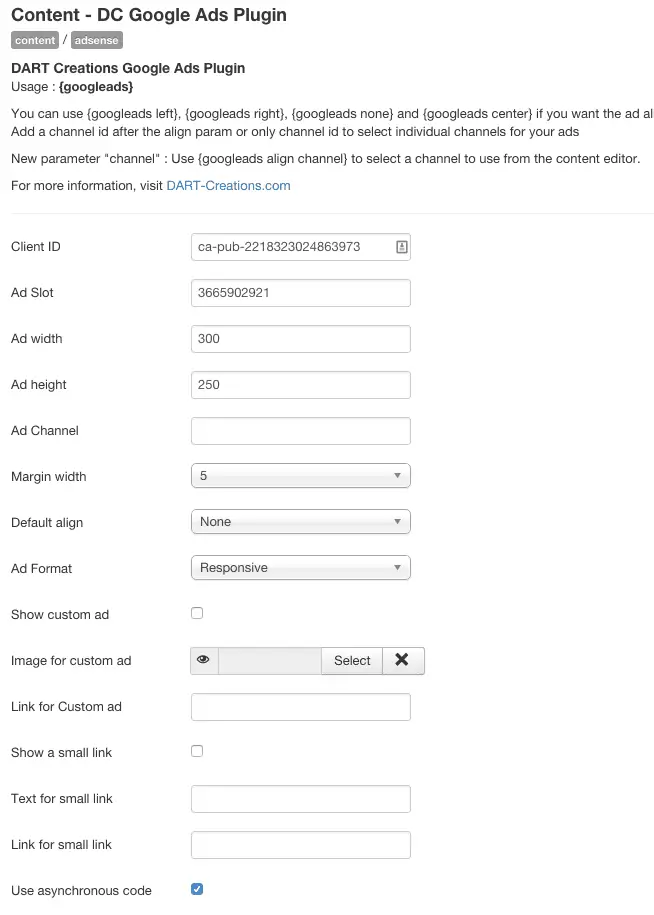
You can also specify the alignment of the ad (left, center or right), and also specify a custom channel.
These are the parameters available
- Google AdSense Client ID - your Google AdSense publisher ID
- Ad Slot - as per AdSense parameters
- Ad Width and Height - the size of the ads as per the slot you are creating
- Margin width - (to make sure the ad does not touch or overlap on the content)
- Default alignment (left, center or right) - this is the alignment that would be enabled if you do not specify an alignment in the tag. i.e. if the default is center, if you don't specify googleads left or googleads right, the ads will display in the center
- Google Ad Format - Responsive, Leaderboard, Large Rectangle, Large Skyscraper etc. etc.
Custom Ad Parameters
Of course, if you want to use a custom Ad instead of the Google Joomla we have the parameters for that.
- Switch on | off custom ad
- Image for custom ad
- Link for custom ad
- Switch on | off the link to "Advertise here"
- Customizable text for "Advertise here"
- Customizable link for "Advertise here" text
Download - Free version of AdSense Joomla
The free version is a bit more limited in scope than the pro version, but also allows you to put Google AdSense code within your articles!
You're going to make much more money thanks to this plugin, so do buy me a beer (€3) ;)
Joomla 2.5 and Joomla 3.0 - Buy me a beer version (€3)
Download FREE
Go ahead, take it for free if you really can't afford a beer :)
Joomla 1.5 (No longer supported)
If you like it please link to us and review the extension on https://extensions.joomla.org/extensions/extension/ads-a-affiliates/affiliate-systems/dc-google-ads/
The plugin should be fairly easy to use.
Install the plugin, put in your Google AdSense parameters from your pre-defined Google AdSense ad, and remember to enable the plugin.
Then go into your articles and insert { googleAds } (without any spaces) where you want the add to appear. Add { googleads left }, or { googleads right } or { googleads center } if you want specific alignment of the ads to your content.
If you find any problem while using it, please drop a line in the comments below, and we will do our best to support you.
If you like it and used it, please do leave a comment with a link to your site, it would be good to know that other people have found it useful. We consider this to be just a(nother) drop in the open-source ocean.
Demo
The plugin will display a Google Advert similar to the one on the left based on the parameters you have defined
Compatibility
The only currently supported version is for Joomla 3.



Please leave a useful comment with your thoughts, then share this on your Facebook group(s) who would find this useful and let's reap the benefits together. Thank you for sharing and being nice!
Disclosure: This page may contain links to external sites for products which we love and wholeheartedly recommend. If you buy products we suggest, we may earn a referral fee. Such fees do not influence our recommendations and we do not accept payments for positive reviews.





 and many more ...