
Every Joomla website - whatever the focus, requires a number of essential things to make sure it's top-notch. If you're not taking care of these essentials, you're probably missing out on a lot of value. That's why we've created a list of best Joomla extensions are that every site needs to take it to the next level.
1. SP Page Builder
With more and more people getting into the online world, people want to be able to build their websites quickly and easily.
Content editors and modules used to be the thing. But today there is a new normal.
It's called drag and drop page building.
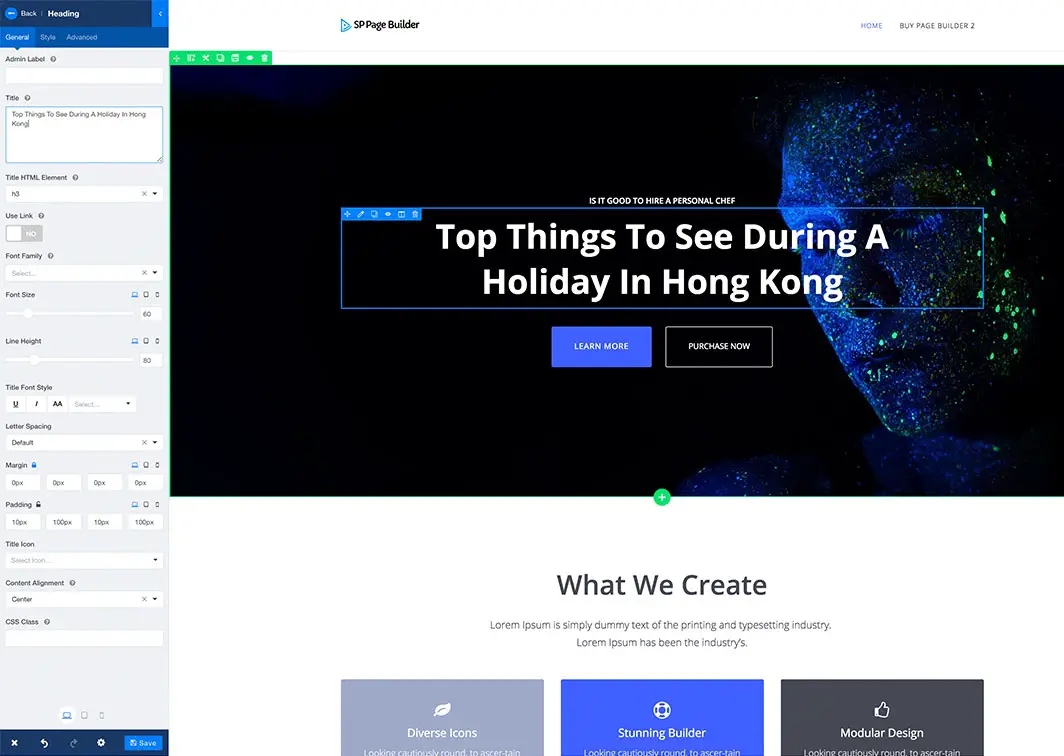
This revolution started first in WordPress, but Joomla quickly caught on to the trend and Joom Shaper have come up with the killer page builder for Joomla.
SP Page Builder is the number 1 drag and drop page builder for Joomla.
The beauty of this page builder is that it allows you to create a website without any coding at all. Actually, not just any website, but a great looking website! You can use many of the available add-ons as "parts" to drag and drop such as:
- Accordion
- Contact Form
- Joomla module
- Alert message
- Carousel
- Buttons
- Countdown
- Feature Box
- Google Map
- Gallery
- Pricing table
- Images
- Progress Bar
- Testimonials
- Timeline
- Twitter Feed
- ...and many more.
It also integrates nicely with other Joomla components so you can drag and drop articles, products, and K2 items!
Price: Free | $59
2. ACYMailing
If you're not doing email marketing - you're leaving money on the table
If you have a website - then you should be building your email list - that's web marketing 101. And if you're building an email list and sending out mailshots - you should be doing it with the most popular Joomla extension for emailing: ACYMailing.
This software is a fully-fledged mailing component - feature-rich, and gets ticks in all the right boxes.
You've got multiple scripts and components to allow you to grow your email list quickly and integrates very neatly with the CMS - allowing you such benefits as adding a user to an email list upon registration.
We've got it set up and bringing in more sales - and you should too!
First things you should do after you install AcyMailing:
- Create your first list - let's call it "Our Awesome newsletter"
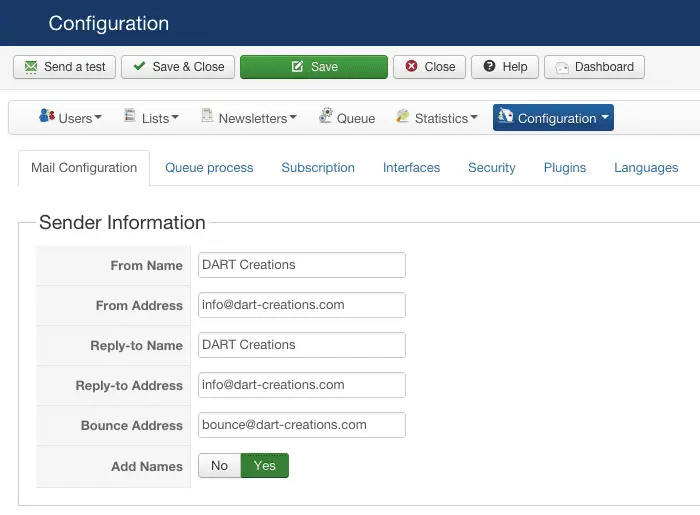
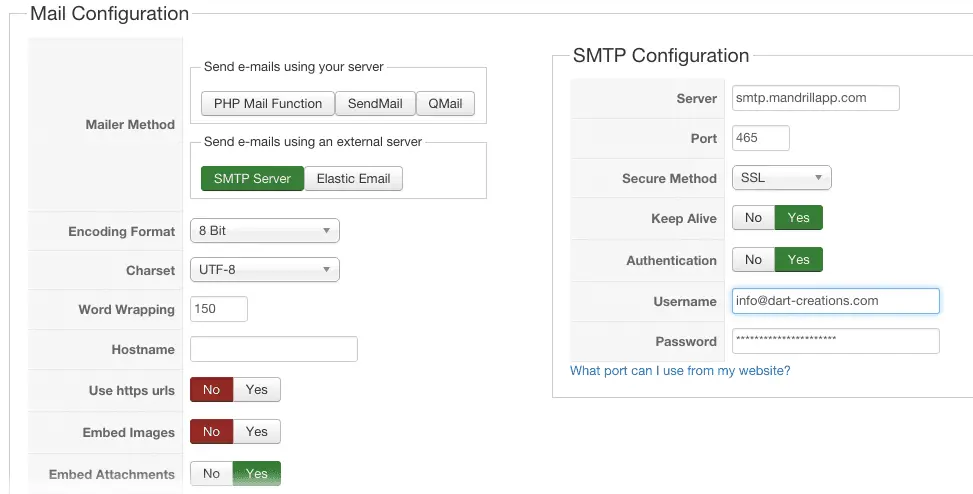
- Configure your Sender Information and Mail Information. You'll want to look to your hosting server's CPanel mailing information to do this.
Configuration > Configuration > Mail Configuration
The sender information should be pretty straightforward (make sure the From and Bounce email addresses have been created)
You're most likely to use an SMTP server whose information is available through your hosting server's CPanel information. Typically it's something like mail.<yourdomain>.com but double-check with your server. If you use an external mailing service such as Amazon's Simple Email Service - this is where you should set it up with the details provided
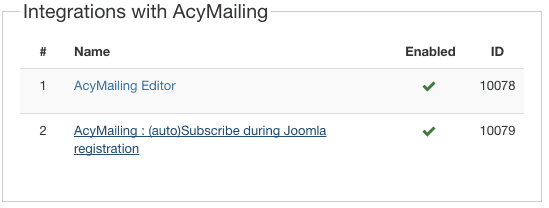
3. Enable the auto-subscribe during Joomla registration plugin. You can configure all the look and feel options by clicking on the (auto)Subscribe during registration
4. Create a module which allows user to register and call the module from your best content. Set it up in position subscribe - then call it from your best content using the {loadposition.subscribe} trigger text.

Which would look like this in your content:
5. Create your first newsletter - test it and queue it up and Process it. Enjoy the boost in traffic :)
Price: Starter (Free) | Essential (€78/year) | Enterprise (€240/year)

3. JFBConnect
Joomla extension to Get People to Engage via their Facebook profile
A must-have piece of functionality on your website is integration with Facebook. With more than 2.5 billion active users in 2020 - this is by far the biggest active network anywhere.
You'll want to ride that wave.
Integrating comments via a user's Facebook profile is great for a number of reasons:
- Users don't need to register or create a new profile - they just log in with Facebook
- You won't have (a lot of) abuse or SPAM because most people want to keep their Facebook clean
- Commenting via Facebook is a normally accepted method of commenting on the web
- You'll get an additional boost in traffic from people seeing their friends commenting on your website or engaging each other on your site.
First things to do after installing JFBConnect
1. Run an AutoTune and follow the instructions carefully

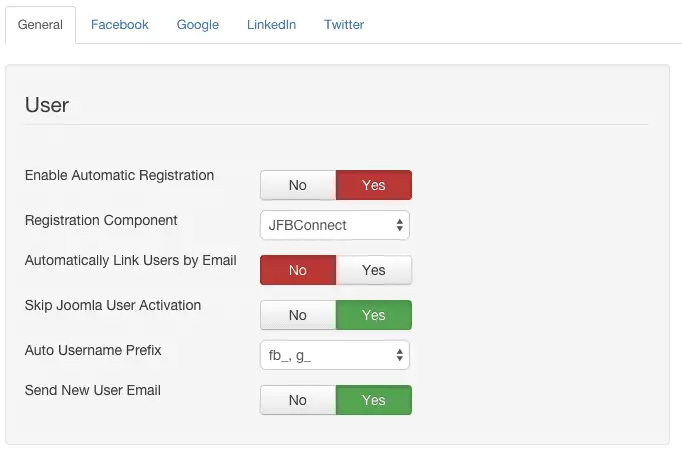
2. Enable Automatic registration (to gather emails for your newsletter (see above)
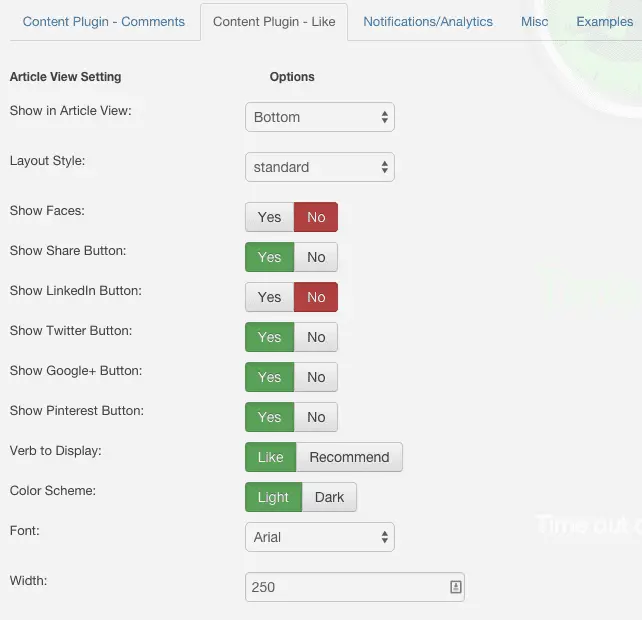
3. Configure the Facebook comments look and feel

4. Configure the share buttons for various social networks
5. Enjoy the boost in traffic and engagement
Price: $49.99

4. Akeeba Backup
Make sure you have a reliable Joomla extension to create a backup
Ok, so you've probably been through this yourself - or heard the horror stories.
You forgot to update a specific extension, or skip a core update, and suddenly your site has been hacked, defaced, is spewing malware all over the place, and who knows what's become of your content.
Or even worse, you make a mistake and you delete something crucial, with no way to revert your change. Panic ensues.
What do you do when the brown stuff has hit the fan? Of course, you go back to what you should have had in the first place.
A reliable backup.
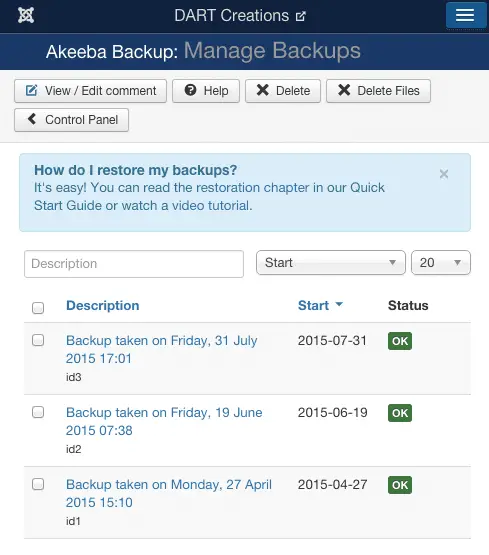
If there is one single extension we would say is absolutely critical to your site - it's Akeeba Backup. It's an elegant, reliable, and stable backup solution. No website should live without it, and if you want your life to be easy peasy, Akeeba backup is the way to go for your backups. It's brain-dead easy to use.
The first things you should after installing Akeeba Backup
- Run the Configuration Wizard to determine the ideal setup for your website

- Take your first backup
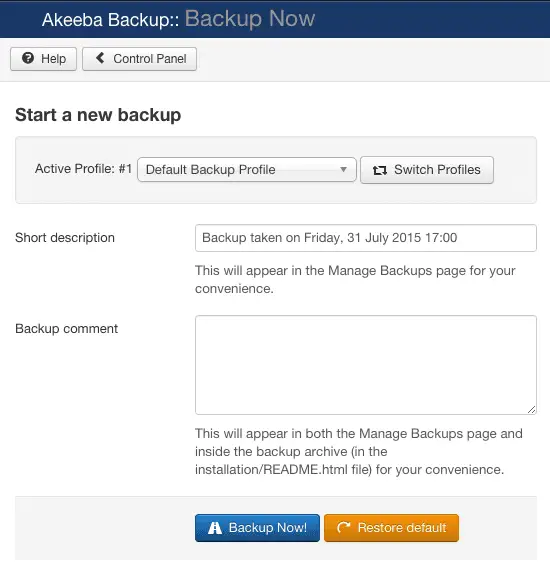
- Download your first backup and store it somewhere safely (Dropbox is a good idea

- Create a backup schedule or create a reminder for yourself to run a backup (at least) every week. Do other necessary stuff such as excluding directories with large files which you don't need to backup or create different backup profiles
Price: FREE to download | €50 + VAT

5. EasyBlog
Because this Joomla extension makes your site great for blogging too!
Despite not being as popular as WordPress for blogging, or have much of a reputation for this, Joomla is great for blogging too! We would know - we've been using it for blogging for more than 15 years now, and of course, we wouldn't have if we didn't find that it suited our purpose well :)
Nevertheless, there's so much more that can be achieved by a blogging platform - so we're going out on a limb and suggesting and even greater set of blogging tools for it.
EasyBlog has been the defacto blogging component to go far if you are serious about blogging ... we can't rave enough about it. Access control, notifications, team blogging, location services, social support, support for most major 3rd party integrations, there's no better choice for blogging with Joomla!
A few great things you can do with EasyBlog
EasyBlog 5.4.2 has recently been released. Version 5 had introduced a new and unique text editor, the EasyBlog 5 composer. One of the unique qualities of the composer is the option to add elements, called blocks, on the blog post by using drag-n-drop or tap-n-drop.
Let's see how you can embed and share your favourite songs from Spotify into your EasyBlog post with 4 simple steps:
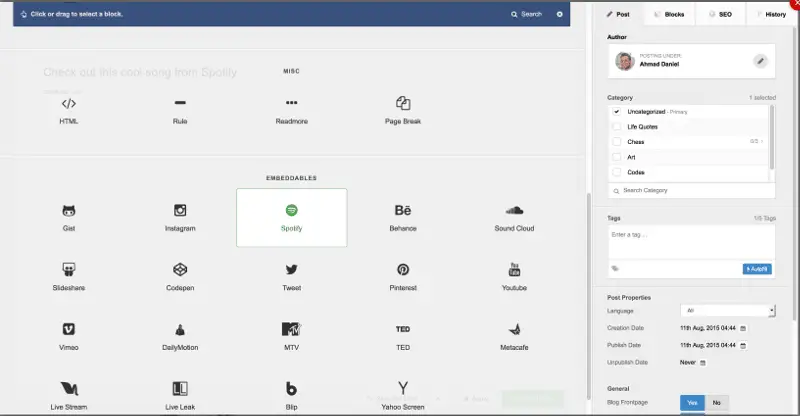
- Open up the Composer and tap on your preferred block. For this tutorial, we'll use the "Spotify" block
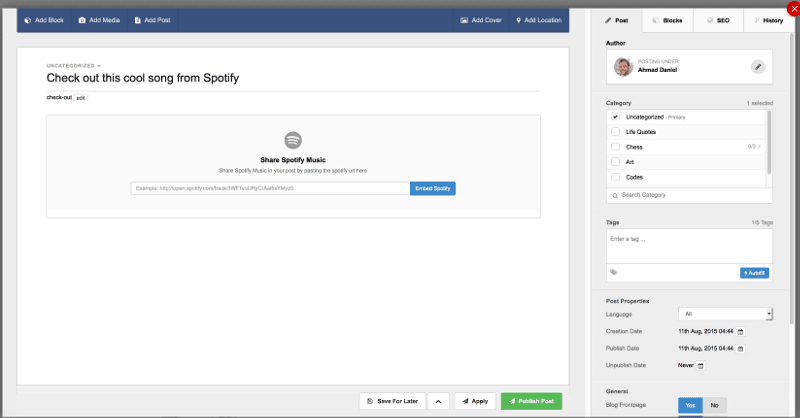
- Once you've tapped on the Spotify block, you will be shown your composer page again. Click on any space on your composer to drop the block, and the Share Spotify Music option will be shown.
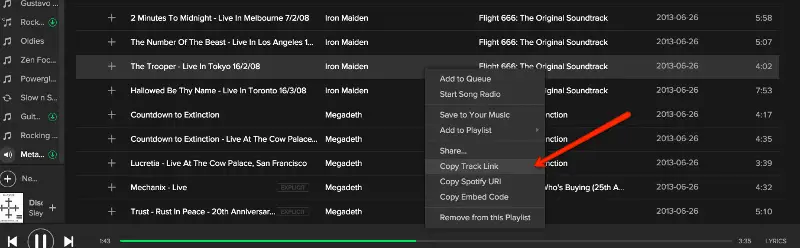
- Fire up your Spotify, right-click on the songs that you wish to share, and chose "Copy Track Link".
- Moving back to your Composer, paste the link in the text box and click "Embed Spotify"
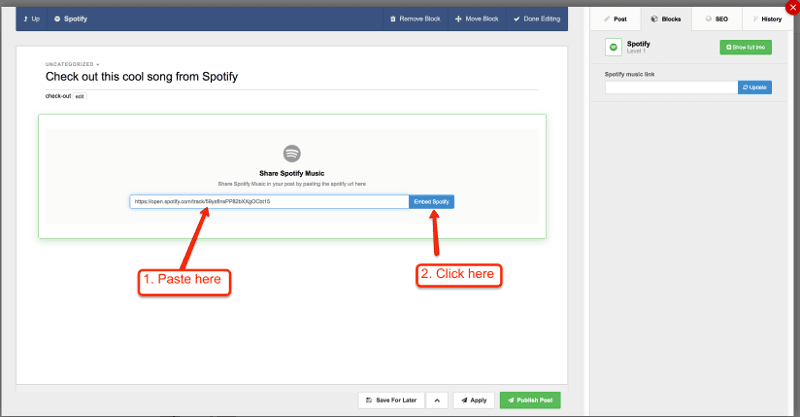
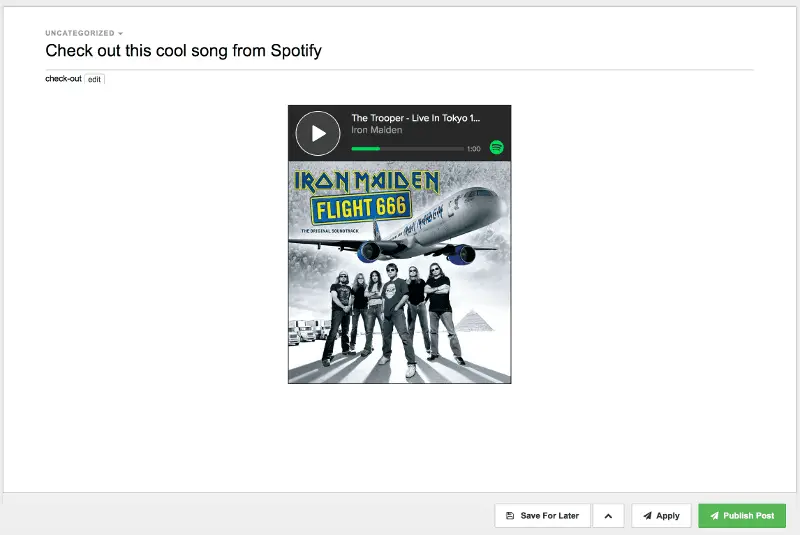 That's it! The song is embedded in your post; clicking "Publish Post" will share the post along with the embedded Spotify player so that your visitors are able to listen to the song without having to load up Spotify.
Price: Professional ($79) | Unlimited ($199)

6. JSitemap
Because you really want Google to know about all your content!
If there is one important visitor to your site, we've always said, it's Google.
With Google being one of the biggest potential drivers of traffic, you need to make sure that the search engine knows about all of your content, all about your freshest content, when it's been updated, the structure of your site, and when your content has been freshly updated.
Although this may seem like a huge task, in reality, it's covered by one simple piece of functionality - an XML sitemap. Essentially, this is a map of all your content that can be submitted to Google WebMasters to "advise" Google about your site's content.
Now - how do you generate this freaking sitemap? - especially if you have a website with lots and lots of content.
Fret not - we've got the solution for you! And that solution comes via the Joomla extension: JSitemap!
JSitemap is an essential Joomla component that can be used to generate the XML sitemap with the content of your website for submission to Google WebMasters.
It makes the task of generating the sitemap really trivial.
Of course, the Sitemap can be submitted to ALL major search engines such as Bing, Yandex, and even Baidu! But besides generating an XML Sitemap - this component does so much more.
Not only does it generate the sitemap for your own content, it also indexes content from any 3rd party components you have installed, and content from RSS feeds. And since we know how important it is to keep the search engines updated, JSitemap also auto pings search engines and aggregators when new content is added or updated.
Oh yes - before we forget - a sitemap is a good thing to have for your real visitors too - the humans who visit your website. They'll be able to quickly identify what content they want to visit.
Yes - JSitemap does this too ;-)
First things you'll want to do after installing JSitemap
The great thing about JSitemap is that most times it configures itself fully without your intervention, so you only need to get installed most times, and right after the install it will self-configure.
- View the HTML and then the XML Sitemap by going to Control Panel > Show HTML Sitemap and Show Raw XML Sitemaps
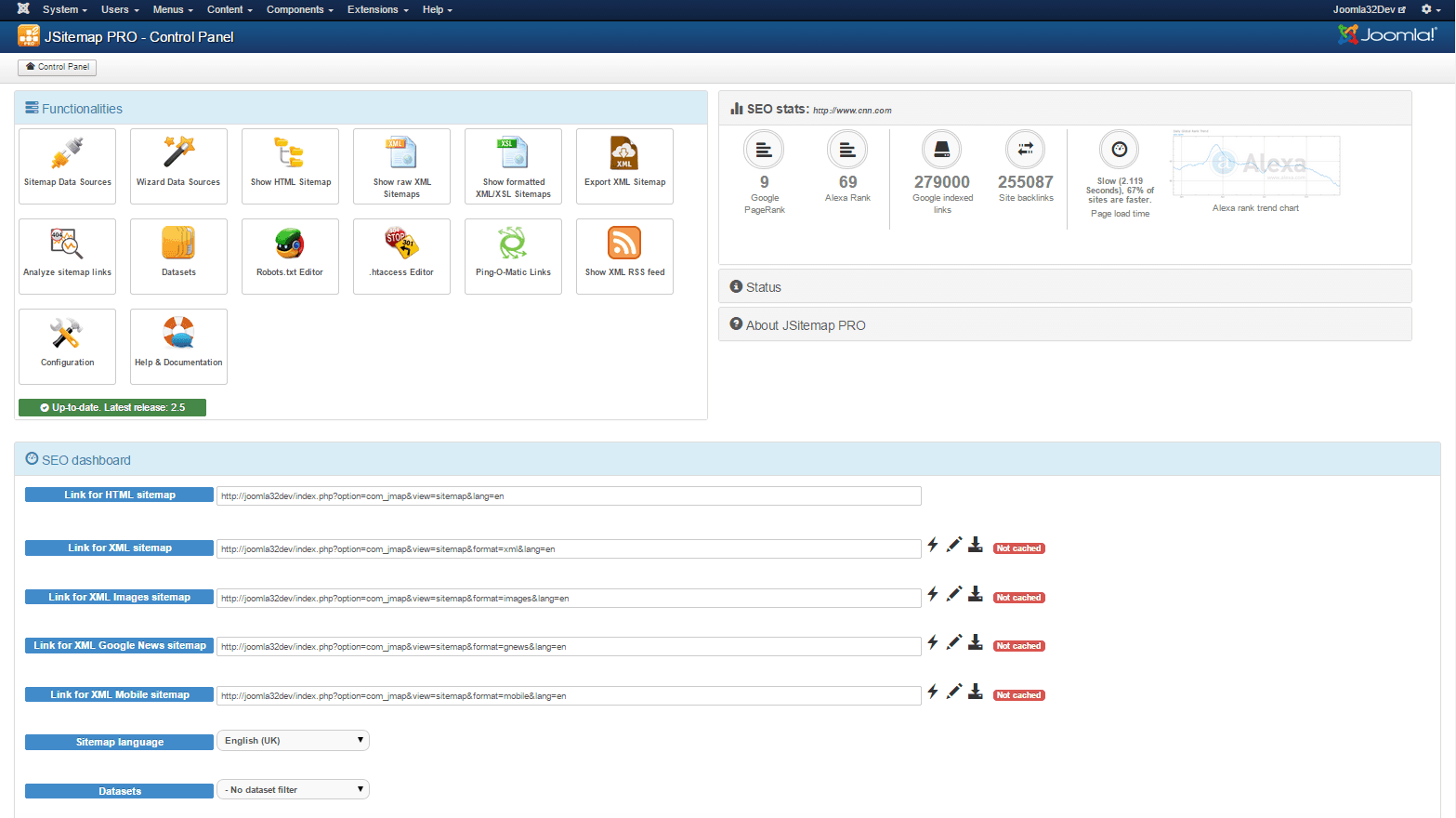 2. Customize the HTML sitemap to your heart's desire via the Configuration icon on the Control Panel and refresh the HTML generated to see the changes.
 - If you've got any 3rd party Joomla extensions like K2, or whatever else, go to Control Panel > Connect Data Sources and click New data source and let JSitemap work its magic. Refresh the content of the XML and HTML sitemap and admire your handy work ;-)
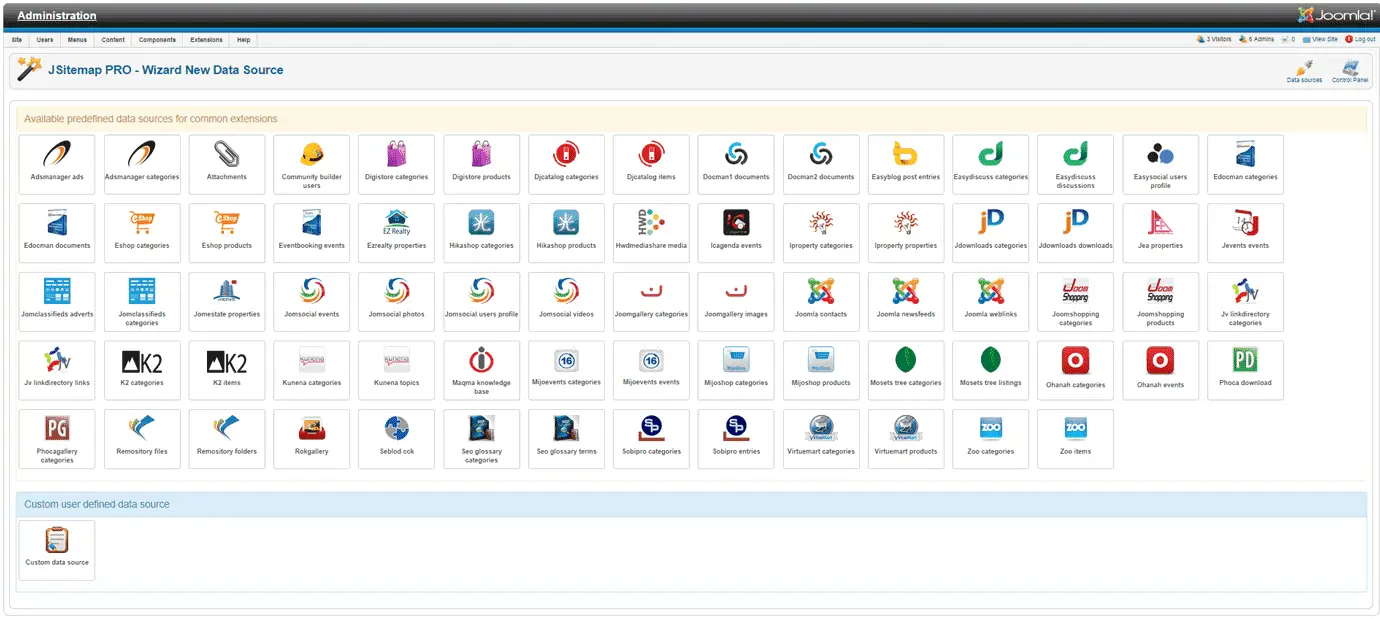
- In the SEO dashboard - submit the XML Sitemaps to Google, Bing and Yandex by simply following the wizard.
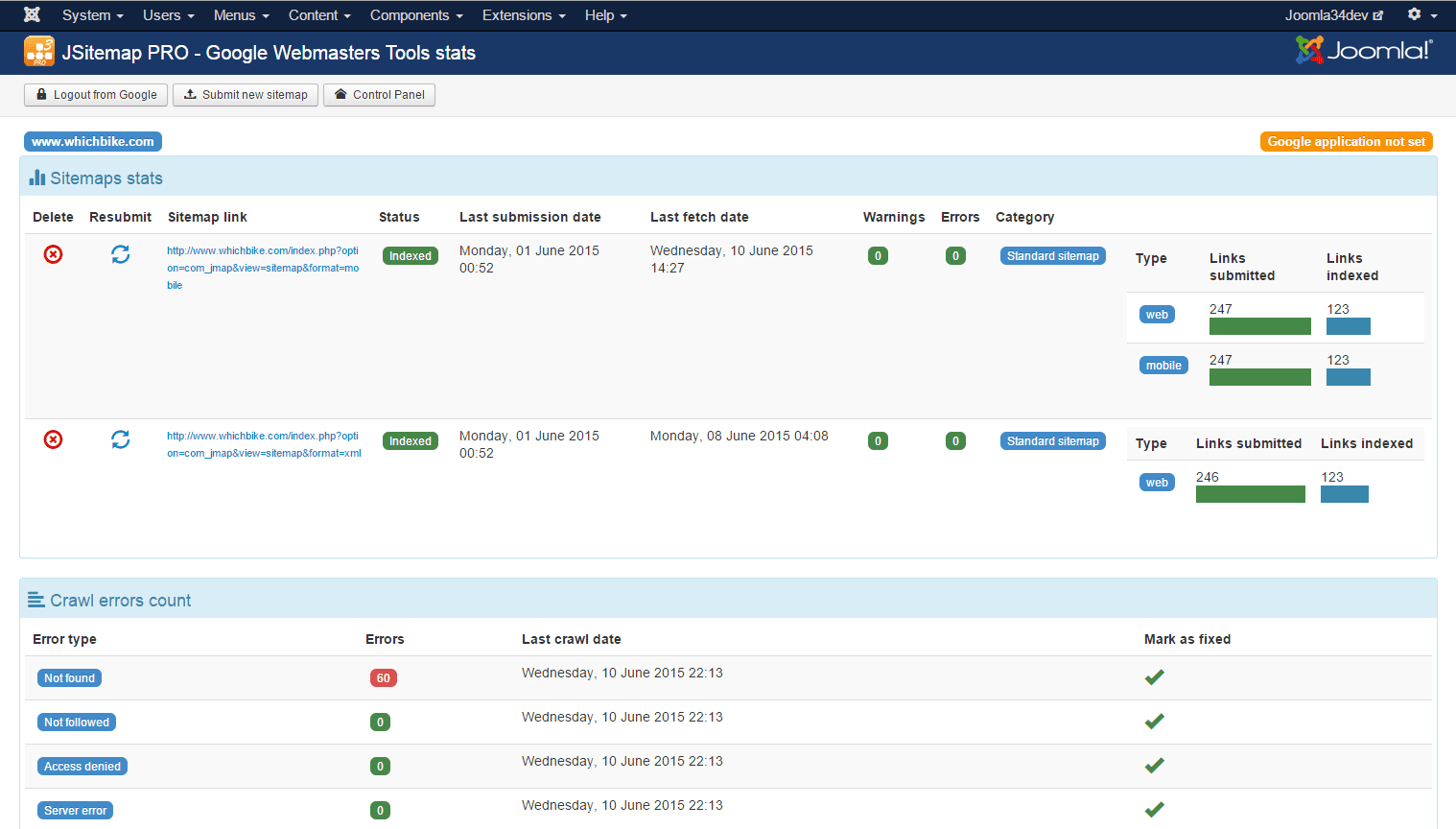

Really and truly, this component is amazing. No wonder it's a Community choice!
Price: $49.90

7. Contact Enhanced Component
Don't you want to make sure your clients know how to Contact You?
You know those fancy Google Map location maps on Contact Us forms - you like them, don't you? And you do want them on your website too.
And whilst we're at it - the Joomla Contact form could do with a few enhancements and more flexibility don't you think?
We've got the solution to all your "Contact Us" problems right here!
Contact Enhanced is a Joomla extension which is a contact manager and form component extension. It plugs in some of the missing features in the core.
Just a few notable features provided by Contact Enhanced component:
- QR Codes,
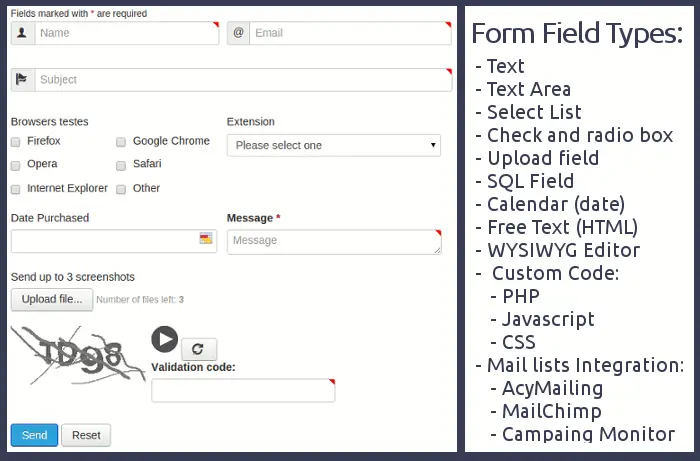
- unlimited form fields,
- Google Maps integration,
- integrated Captcha,
- integration with AcyMailing and other 3rd party mailing systems and so much more!
First things you'll want to do after installing Contact Enhanced Component
- Once it's installed, create a Category for your Contact Enhanced Contacts. Go to Components > Contact Enhanced > Categories and create a new category and then go to Components > Contact Enhanced > Contacts and either create a new Contact or import your Joomla Contacts.

- To use contact enhanced as a manager create your contacts and configure the component options then category OR categories menu item.
You can now display the Contacts using the Contact Enhanced Contact Slideshow, or Contact Enhanced Category. If you have many contacts you can enable the Contact Enhanced Alpha Links to display A-Z links;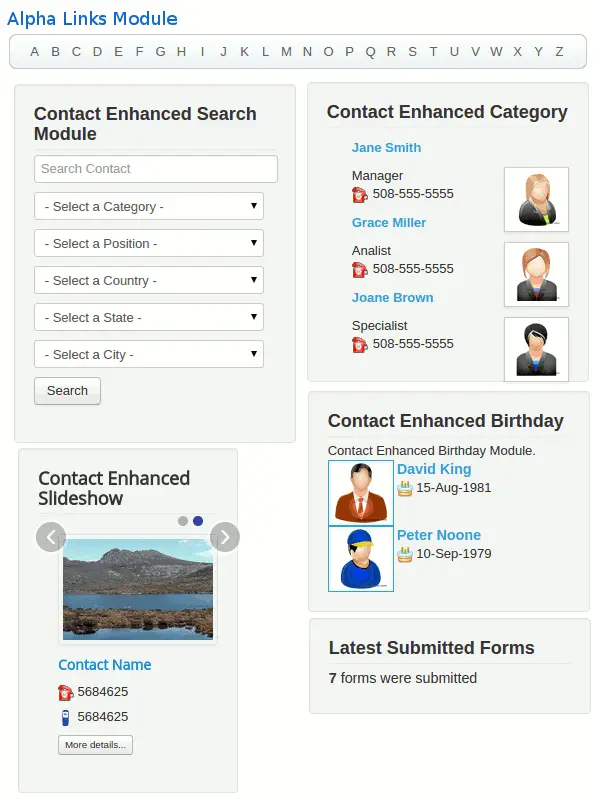
- To create a new form in Contact Enhanced, go to Components > Contact Enhanced > Form Fields and create the new Form Fields for the categories you want.
- You can extend the functionality of Contact Enhanced by integrating it with other extensions and/or services like iStoreLocator, SalesForce, Google Spreadsheets, AcyMailing, Campaign Monitor, MailChimp, Constant Contact, ...
Price: From $29

8. RSFormPro
Why code your form when you can create them with a few clicks?
One of the things I've always secretly but absolutely *hated* about the CMS has always been the contact form. It's very basic, it's not flexible and it could do so much better. We'd love and would want to will it to be better - but it refuses to - and just sits there in all its simpleness.
Fortunately, there are some many great Joomla extensions that come to its rescue.
Besides contact forms - many websites will require extensive types of forms.
Whether for picking leads, creating customer satisfaction surveys, gather some kind of information from your visitors, request for quotations with specific custom fields, custom forms are an essential piece of functionality you'll probably want to have.
RSFormPro is our first choice when it comes to create custom forms. Again it does all the things you want and need from a forms component - and is one of those components you'll be kicking yourself for not having found and/or tried earlier!
First things you'll want to do after installing RSFormPro
1. Create your first form go to Components > RSForm!Pro > Manage Forms and click the new button. Use the wizard to make your life even simpler.

2. Give the form a name (this will appear in the frontend) and choose what the form will look like (1 columns, 2 columns etc.) - there are various choices you can make. We recommend you choose Responsive - what with mobile being so popular nowadays.
A recommended option is enabling the mailing of the results to your email address (set to Yes and include your email address). You can also choose to enable a send confirmation of the form submission to the user - which is of course highly recommended too for an optimal User Experience.
Choosing to display a thank you message or redirect the user to another URL (a thank you page) after the form was submitted is a touch of class that you should implement. 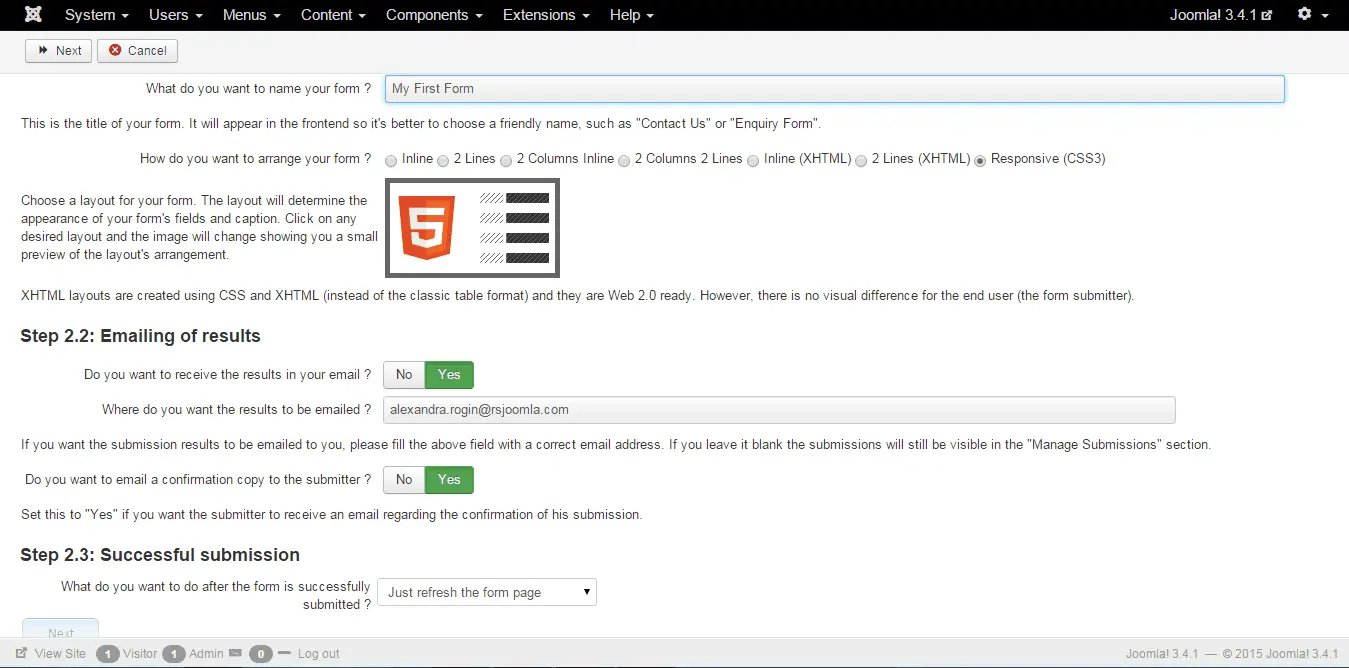
3. Let's just make create a pimped up contact form won't we since we've been complaining so much about the native contact form ;-)
4. Fine-tune it to your heart's content and save. Just look to the left to see the sheer amount of components you can add to your form!
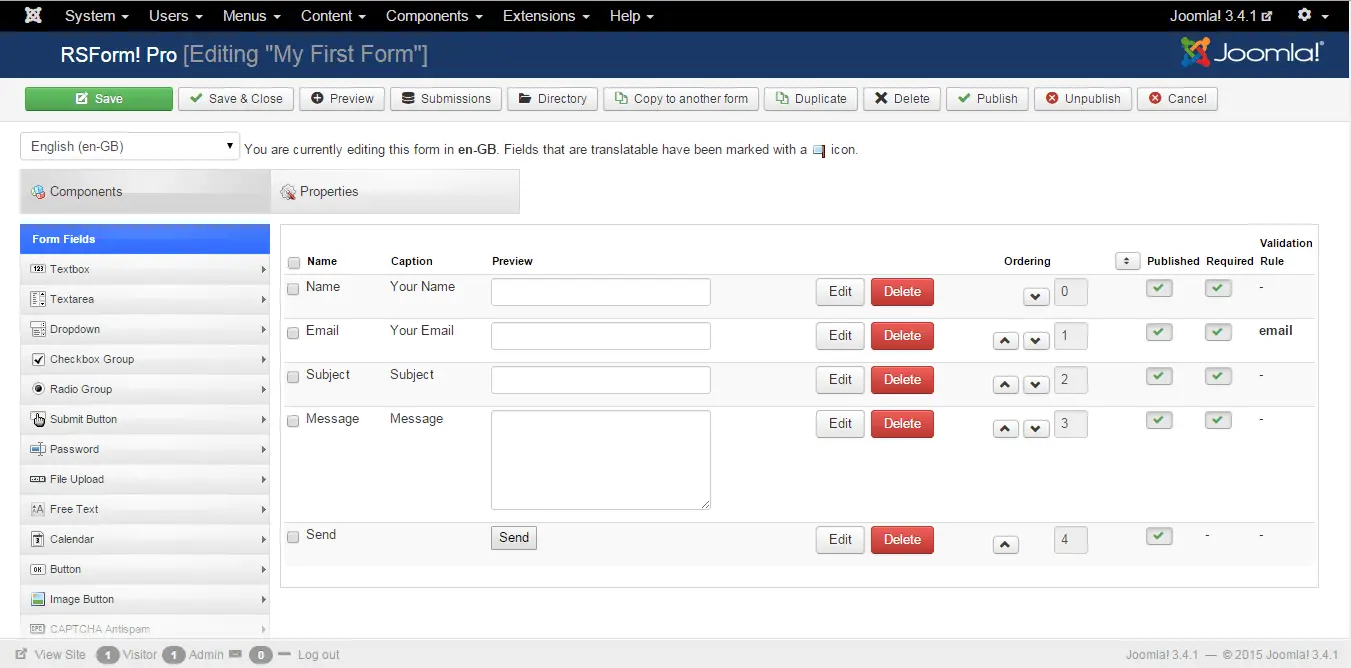
5. As a final step - let's hook the form up to our menu - because of course, we want our visitors to have this as a main menu option! Click on the "Add to menu" option and you'll soon be able to configure this as a menu item.
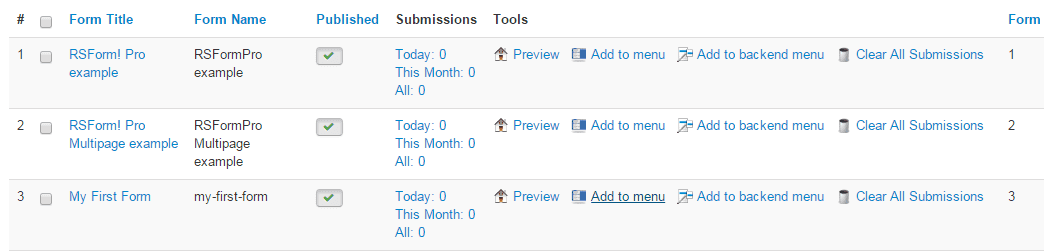
Price: €29.99

9. Hikashop
You won't be making much money unless you're selling online!
If you are not productizing your services and or selling some physical or electronic goods - we believe it's going to be hard for you to make some good income :)
Online shopping has become more common than ever and your website should have an online shop too!
We do believe that an online shop which is directly integrated with your website is much better than a standalone online shopping software.
There are a number of offerings, but our preferred Joomla extension is HikaShop. We've been blown away by its simplicity of setup - literally, you just install, follow the wizard and publish your shop.
Listen to us, grab yourself a copy of HikaShop, and start selling TODAY!
First things you'll want to do after installing HikaShop
1. Run through the simple Setup Wizard
The wizard allows to select what menu items you want to create (whether you want to display a link to the products, to categories of products etc.), how you want to display the products, your address, what tax will apply to your shop, your Paypal address and whether you want to install any sample data (we chose not to).
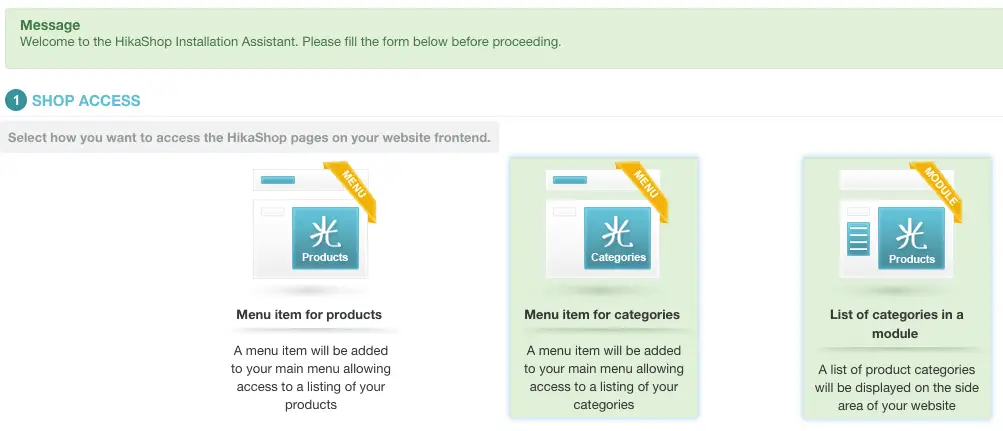 2. Add some of the products you want to sell - drag and drop imagery related to your product - visuals are much better than text descriptions.
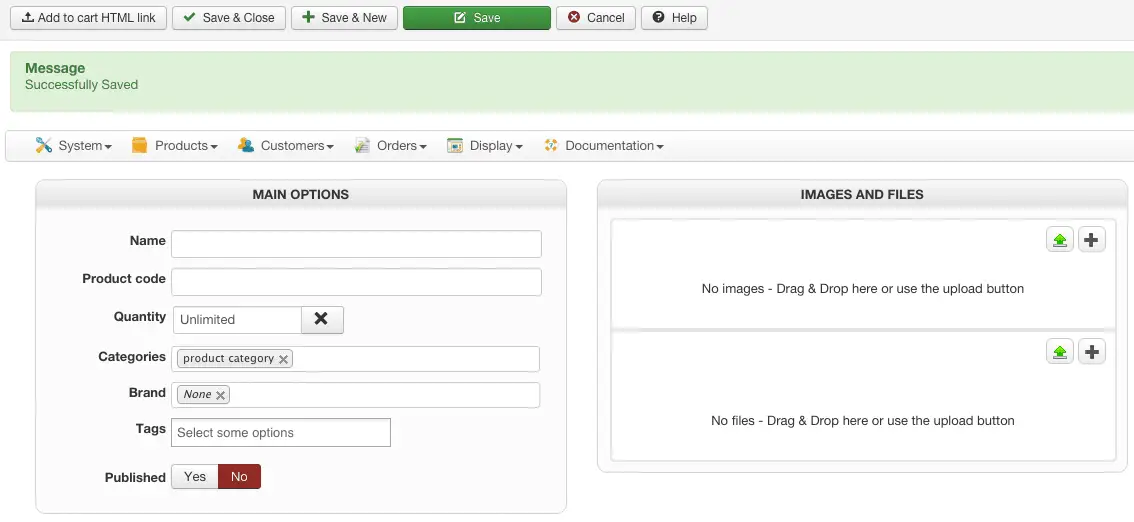
3. Publish one of the (automatically created) menu items linking to your brand spanking new online shop!
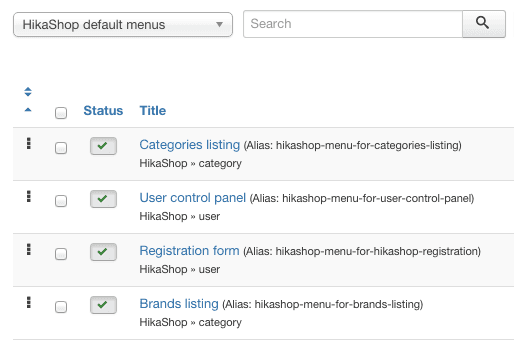
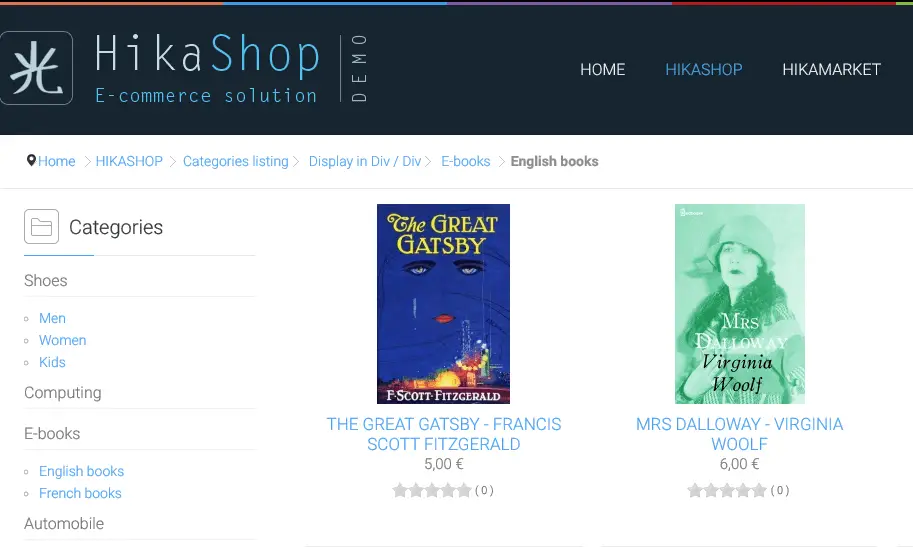
4. Publish the cart module and one of the modules listing specific shopping categories in a sidebar or your preferred location. There's many to choose from, categories, best sellers, last viewed items, random products, best products and many more! You can see how quick and easy it's going to be to setup your online shop right?
Price: Starter (Free) | Essential (€49.95) | Business (€99.90)

10. Joomla Content Editor (JCE)
Turbocharge your content authoring with the Joomla extension of choice for any website
This is one of those Joomla extensions which we literally install on every website!
The feature set of JCE is such that you really can't live without this one.
Most of all, it's the great integration and uploading capabilities of images in the Joomla editor. The native editor, really and truly leaves much to be desired in terms of image management. If your articles are not featuring any images - then you really need to rethink your content marketing strategy and see how images are able to make your content dazzle!
Of course, JCE is not just about great image management. it makes formatting much simpler with Office-like functions, allows you to quickly and easily create internal links, has an integrated Spell check and so much more.
Take it from us - get this installed on your website - right now!
First things you'll want to do after installing JoomlaContentEditor
1. Set JCE as the default content editor in the Global Configuration
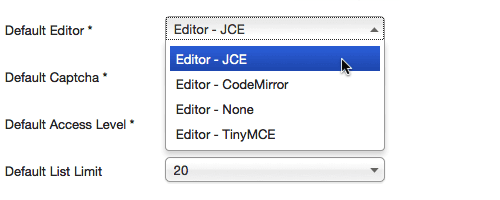
2. Blog and author content with your all-new awesome Joomla Content Editor! Here's a sample of what your new editor is going to look like. Overwhelmed? - you shouldn't be ... it's all fairly easy stuff!

Price: Free or to add all plugins (€29/year)

11. Accordion Menu
Make your site stand out with the awesome Slider Joomla extension
There are two things which you are bound to find on so many sites, that you will be hard-pressed to find sites without them :-)
The first is a good menu system.
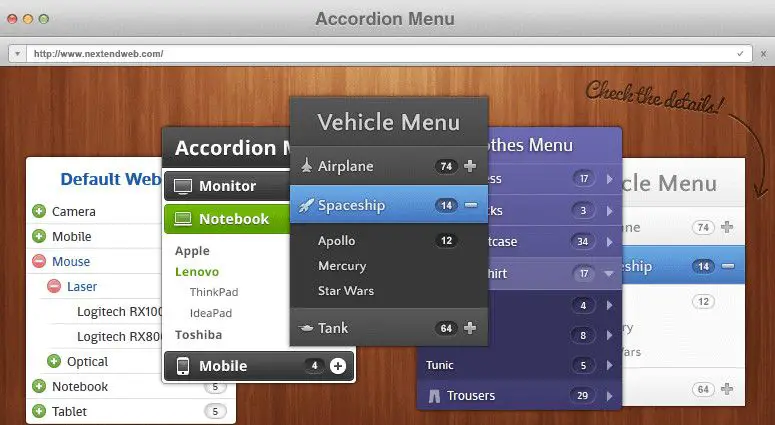
For those who have many menu items to display, you'll need to make sure to create multi-level menus that do not confuse your users. The accordion menu is one of those great options you have which allows you to hide menu items until they are needed. Of course, styling this menu to suit the feel of your site is also important, so flexibility in styling is a must.
Luckily, Accordion Menu has both.
Price: Personal ($30) | Business ($50) | Lifetime ($100)
12. SmartSlider
Next up is the SmartSlider.
You’ve probably noticed that a lot of modern websites feature content that slides or changes in some way.
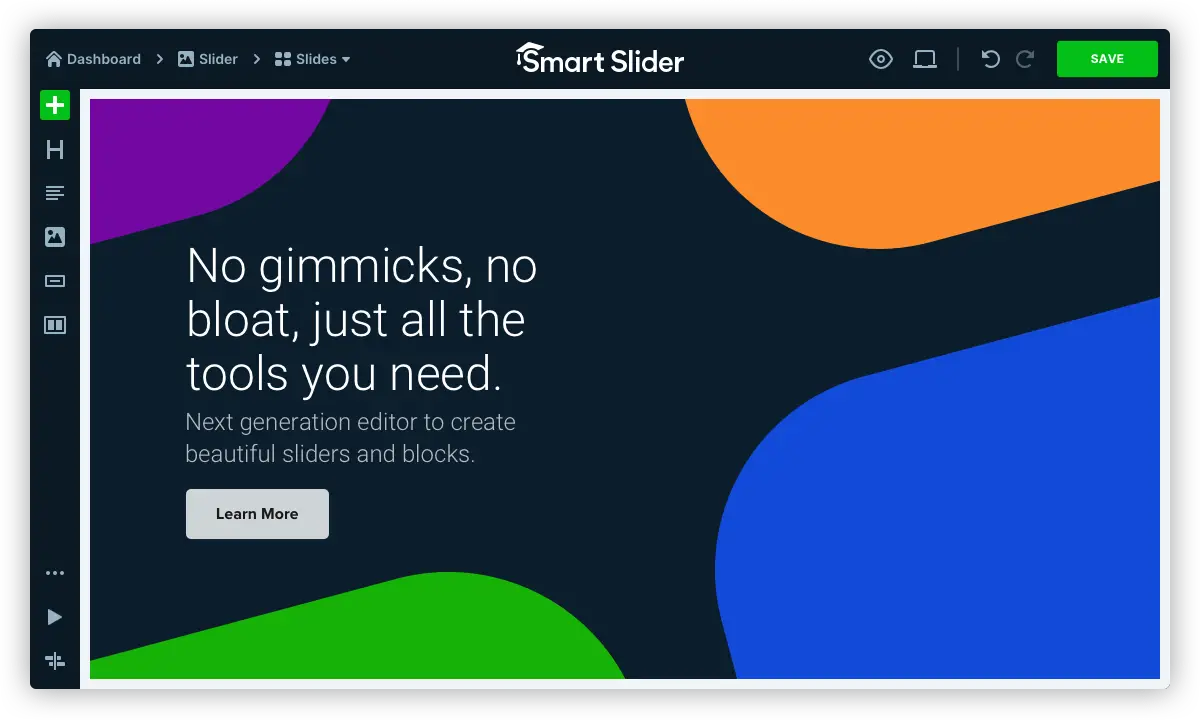
This is a great technique to highlight multiple pieces of content within a limited space and visually capture the user's attention. SmartSlider is one of the best sliders out there ... you won't get it wrong if you go for this one - it's extremely flexible and will work well with such a varied set of sites.
Don't believe what we say? Check out the excellent look and feel on the SmartSlider DEMO site and let that convince you!
Price: 1 Site (€49) | Premium - 3 sites (€97) | Unlimited (€243)

13. Advanced Module Manager
With 10 Joomla extensions in the top 100 - RegularLabs must be doing *something* right
RegularLabs (the authors of Advanced Module Manager) has an incredible record.
There are 10 RegularLabs extensions, in the Top 100 Joomla Extensions on the JED. If that isn't an incredible record to hold, I don't know what is!
So we've chosen the highest rated of the 10 extensions - the Advanced Module Manager. With the native functionality - the module manager is fairly limited in what can it be assigned to - typically it's menu items. This, of course, limits its flexibility - sometimes this is just too limited for the specific feature or function you want to implement.
Advanced Module Manager does away with all the limitations of the native Module Manager.
You can assign modules to just about anything:
- Specific pages,
- specific dates (months, days of the week, seasons),
- specific users,
- specific languages,
- specific geographies (countries, regions, states),
- operating systems,
- browsers,
- content categories,
- keywords,
- meta keywords,
- articles,
- authors - the list is far too long to mention.
Not only that - but it integrates directly with several 3rd party Joomla extensions and allows you to assign modules based on the functionality of 3rd party modules.
First things you'll want to do after installing Advanced Module Manager
Setup some general options in the Advanced Module Manager
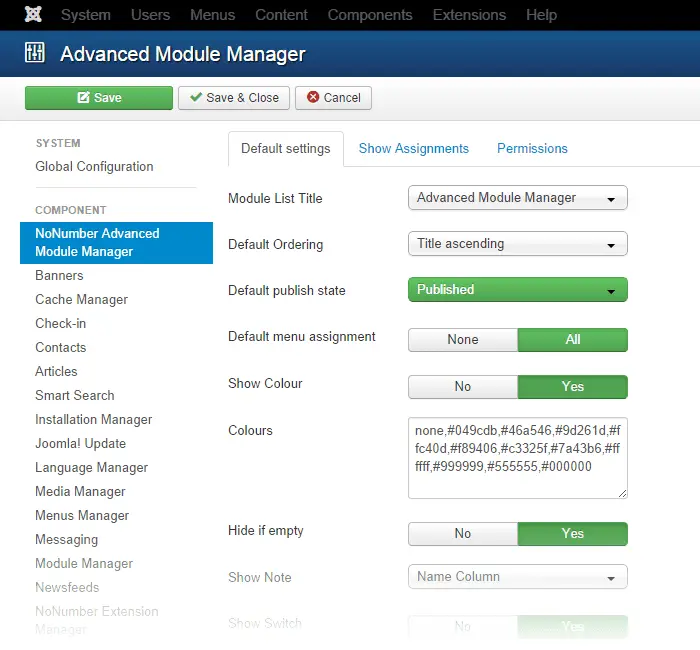
Now enjoy the enhanced configuration assignment functions of each Joomla module and choose to display your modules however and wherever you want :)

Price: Free or Pro (€49)

14. PayPlans
Everybody is creating a subscription - so why shouldn't you earn money like that too?
So recently we've been saying a trend of moving to subscription-based purchasing as opposed to one-off or lifetime purchases.
This, of course, makes sense in today's economy, where suppliers typically keep providing value to their customers, whilst customers keep paying the vendors while they are happy with the service provided. Now - how do we do that using Joomla extensions?
PayPlans is a membership/subscription software that helps you create/manage a membership site. It provides a variety of features related to membership management right from plan/membership selection to register, making payments, and then Access Control Lists, etc.
First things you'll want to do after installing Payplans
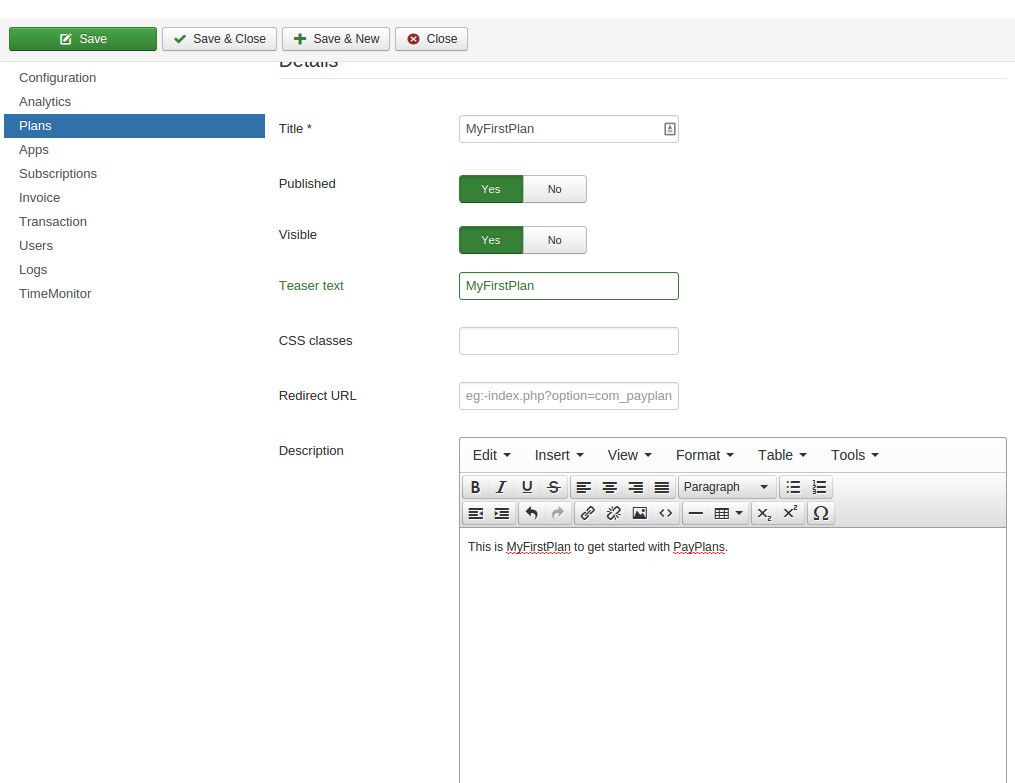
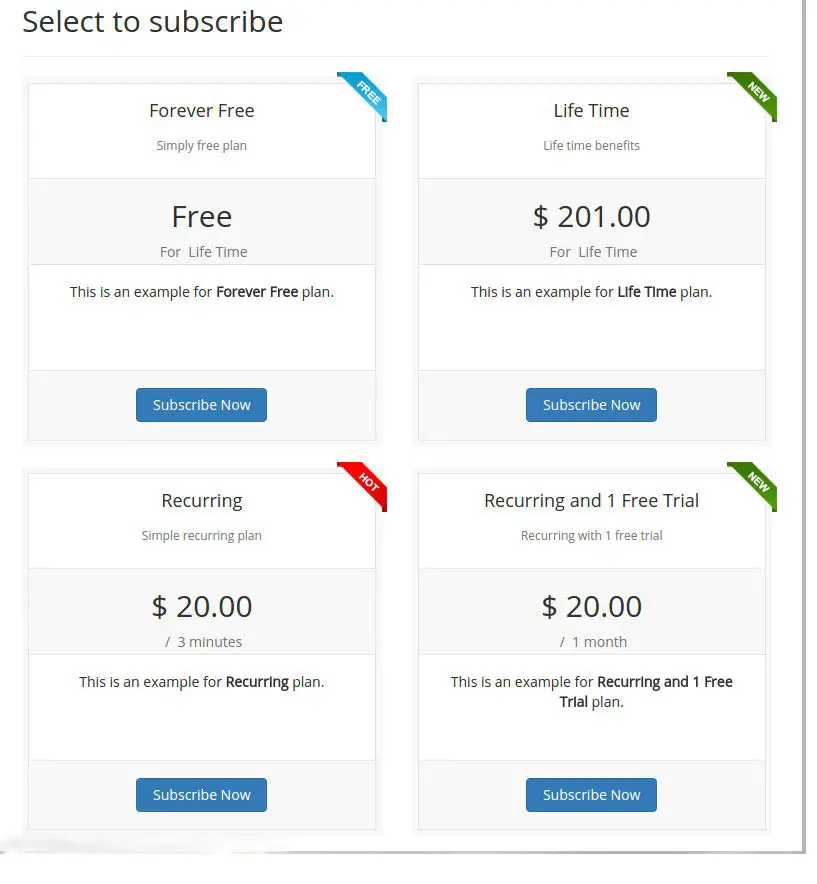
- Create a Plan: Create and set up the plan as per your requirements. PayPlans provides you with the ability to create different types of plans like Fixed/Recurring/Forever/Free. Just create your selling plan with the information that you want to display on that plan along with pricing details.
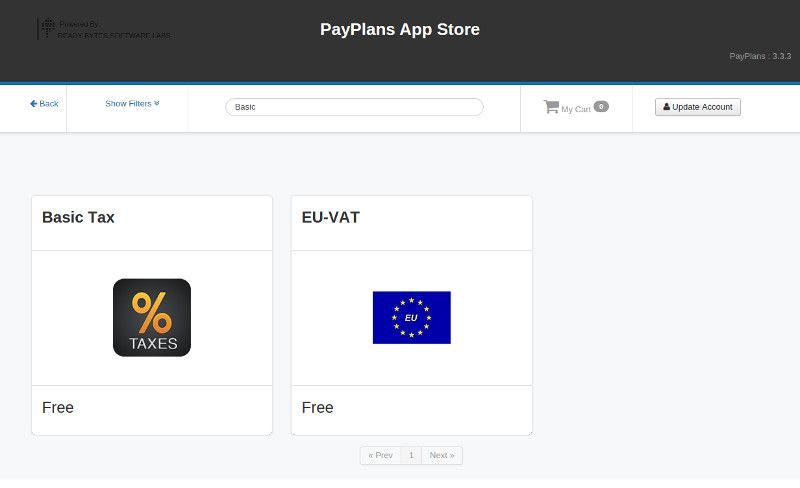
- Install a Tax Plan and connect to Paypal for payment: Once you have created your first plan you have to configure your Plan with the help of related apps. For example, you add Tax. Install the appropriate app from the App Store along with your choice of Payment Gateway and configure the plan with that. PayPlans has almost 35+ payment gateway plugins/apps to make the payment process easy. Enable the plugin from Plugin Manager and configure it as necessary
- Sell: Start selling your membership to your users :) Your users will see a list of all plans that you have created. After completing the payment they will become members of your site to gain access to the content that you want to sell.
Price: Starting from $99

15. DocMan
Downloads much? Yepp - we've got top Joomla extensions that can do that too!
Another very popular use case for your website is, of course, that of providing various types of documents and files for downloads.
When you have tens or even hundreds or maybe thousands of files, then you're no longer in the realm of "downloads" but in the realm of downloads and document management - and you'll need a good Joomla extension to help you out.
The good news is that the good guys at JoomlaTools have you covered! Docman is a document and download manager extension for the CMS which we can personally recommend because we have been using it for many years now!
By organizing everything into various categories, having different types of permissions for various types of downloads, supporting the function where you need to register to download (and increase your email list as a by-product ;-)), support for image galleries, drag and drop download support, support for mobile sites, frontend and remote upload support and so much more - you can't go wrong with Docman.
Evidence of this is the thousands of sites that run on Docman as their downloads manager.
First things you'll want to do after installing Docman
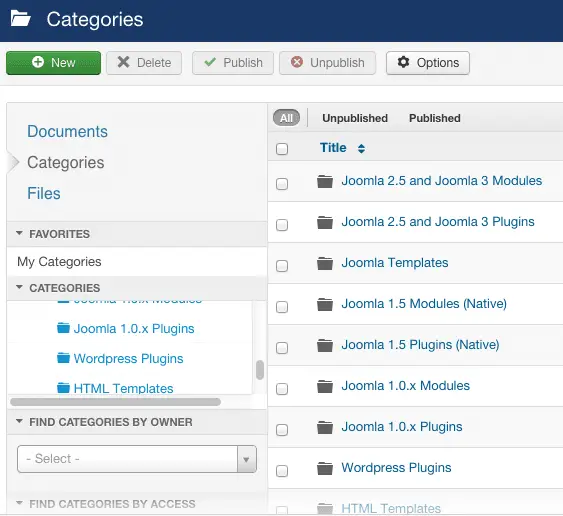
1. Setup your download categories
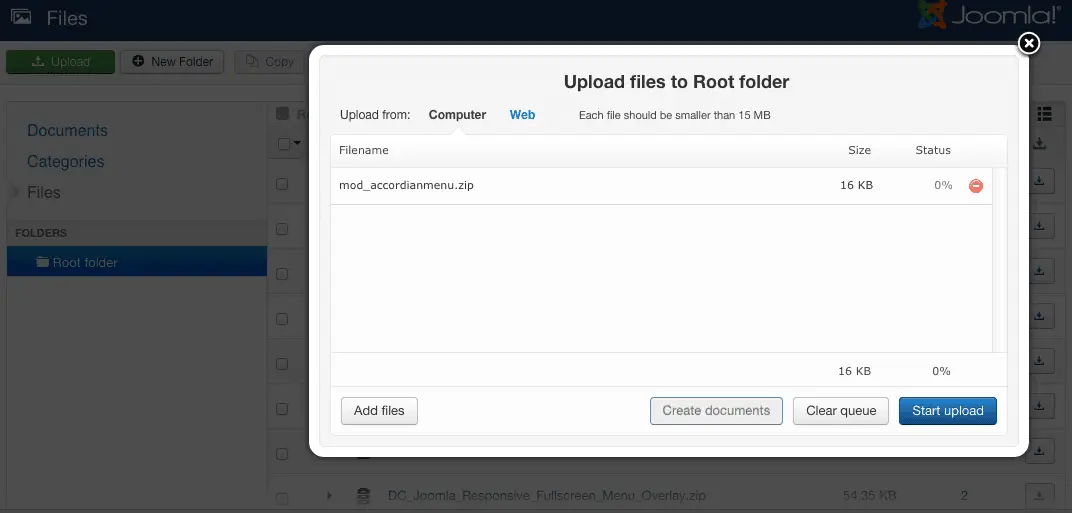
2. Upload a few files with drag and drop
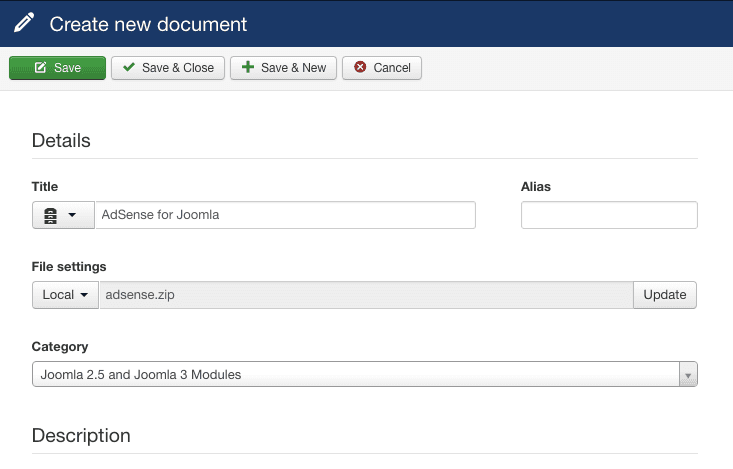
3. Create a document and attach a file to it
4. Enable register to download (and don't forget to integrate AcyMailing above to capture a few emails ;-) ) and publish the Docman link to your menu
Price: Starting from $99/year

16. sh404SEF
Because your URLs should be Search-Engine-Friendly but mostly Human-Friendly!
So many people tout the SEO benefits of having search engine friendly URLs.
Of course, having keywords in the URL of your content is a well-known SEO strategy that has been around since forever. But one value that people forgot to mention is this: Human-Friendly URLs.
Because of course, Search Engines are important but aren't we first and foremost writing content for humans? And if our URLs are not people-friendly - then we're definitely missing out on our primary demographic aren't we?
sh404SEF has been around for a long time and has been the components of choice for SEO and Search Engine Friendly URLs. Once again, a Joomla extension which we use, wholeheartedly recommend and suggest you install this great component too!
But the thing is this - SEF is only ONE thing which sh404SEF does.
Auto generations of Social Sharing OpenGraph metadata tags for better social sharing, extensive handling of 404 pages (so that you can create a friendly 404 error page, and redirect traffic to new pages), integration with Google Analytics so that you can check traffic reports on the spot are only a few of the other things which sh404SEF can do.
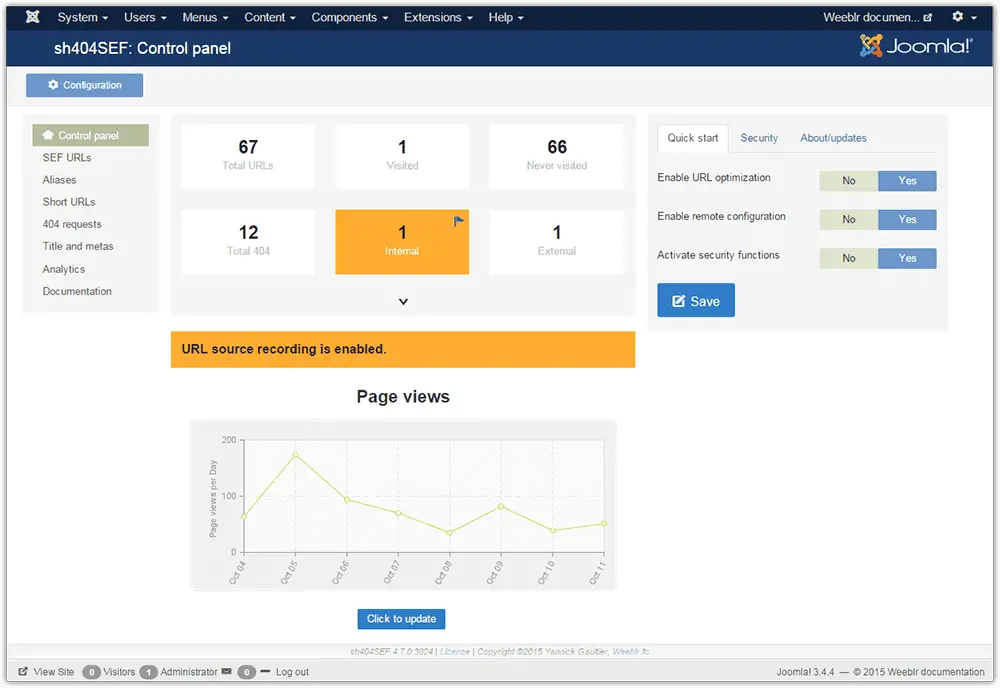
First things you'll want to do after installing sh404SEF
1. Configure the CMS to play nice with the sh404SEF component. Since Joomla natively has it's own SEF functionality, you'll need to override this to make sure sh404SEF takes over the Search Engine Friendly functionality
Enable Joomla SEF URLs in Global Configuration > Site > SEO Settings. Enabling SEF URLs is typically sufficient - though if you've got the know-how, you may enable the rest of the functionality as necessary for your site.

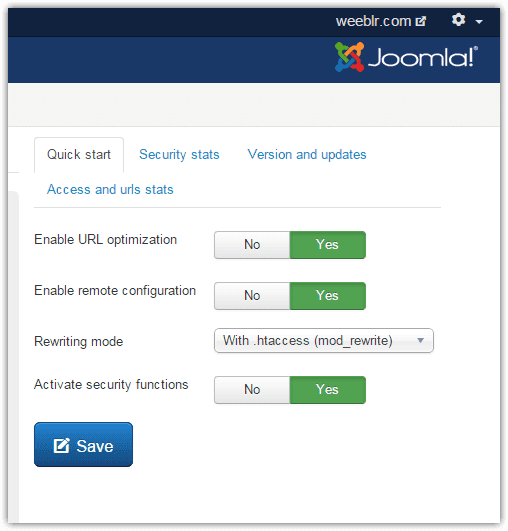
2. Enable sh404SEF
From the Control Panel you can simply enable most of the required options to get yourself up and running with Search Engine Friendly URLs
Price: $44

17. Joomla Events Booking
Our last, but definitely not least top Joomla extension is ideal for many small service-based businesses. It allows you to book or register for events and can, therefore, be used to take bookings against payments.
It supports over 50 payment gateways, so you should easily find one that serves your needs.
The functionality offered by this Joomla extension is quite extensive, both for the business owner and for the front-end user (the person making the booking). Some of the booking features include:
- Limited or unlimited number registrants.
- Fixed start date or a TBC (to be confirmed) date.
- Enable or disable registration (display only events).
- Use cut off date to stop accepting registration after a certain date.
- Private events: Users can only register for the event if they know the event password.
- Featured Events: The events will be displayed on top of the events list.
- Event can be assigned to multiple categories.
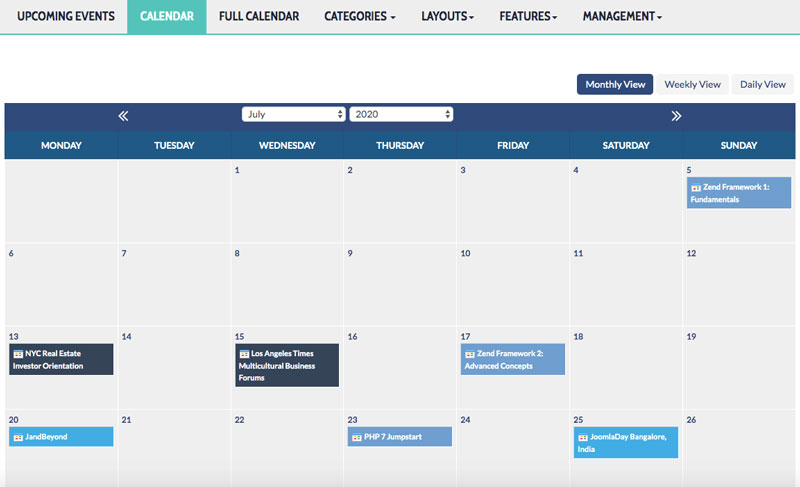
For the front-end it uses a modern, fast loading calender.
You can display your events on a calendar to allow users to browse for events on selected Month, Week, or Day. Two types of Calendar are supported, a Monthly Calendar and a Full Calendar.
Performance is super fast when it comes to page load because events are fetched in a new Ajax process.
Price: $39.99
Have you got suggestions for more Joomla extensions?
That's it for now - we hope you found this incredible list of Joomla extensions useful for you. We have picked the very best because we would only want the best for our own website, so we'll only share the very best Joomla extensions to install on yours :) If you've got recommendations, please comment below!



Please leave a useful comment with your thoughts, then share this on your Facebook group(s) who would find this useful and let's reap the benefits together. Thank you for sharing and being nice!
Disclosure: This page may contain links to external sites for products which we love and wholeheartedly recommend. If you buy products we suggest, we may earn a referral fee. Such fees do not influence our recommendations and we do not accept payments for positive reviews.





 and many more ...